
A tour of the site
COLLAB's website is a portal: one frame around every page, with a sidebar, a top bar and a footer. This tour names each part of the frame, then each page and its address, so you can find your way and know what each page shows. It is for new visitors and members. Everything you see is read from GenesisL1 in your browser; How COLLAB works explains how.
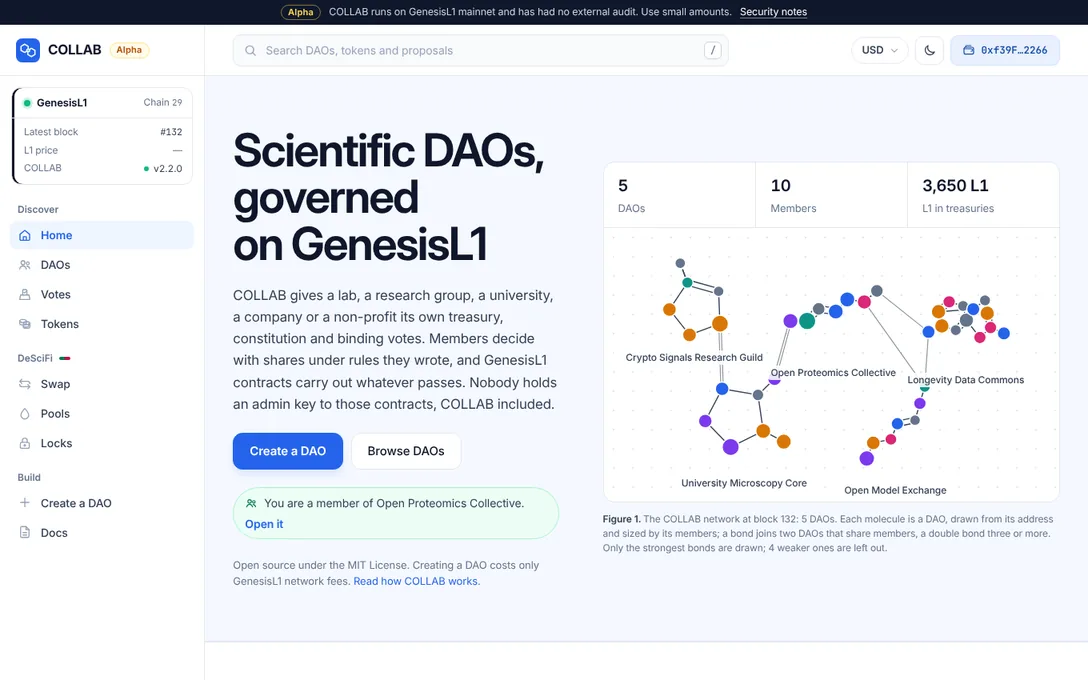
The frame around every page
The sidebar
The sidebar groups the site:
- Discover: Home, DAOs, Votes and Tokens;
- DeSciFi: Swap, Pools and Locks;
- Build: Create a DAO and Docs;
- at the bottom, Settings and Privacy.
The page you are on is marked. Beside the COLLAB wordmark, an Alpha badge says the software is "An alpha version: new, with no external audit".
The network card
At the top of the sidebar, the network card shows the chain, GenesisL1 and Chain 29, and three lines:
- Latest block, updated every few seconds;
- L1 price, with its change over 24 hours, as described under The display currency;
- COLLAB: the version deployed on this site, such as v2.2.0, or Not deployed with a link to the admin page.
Its dot shows whether the RPC endpoint is live, slow or not reachable, and the card links to the network settings.
The top bar
- Search with the placeholder "Search DAOs, tokens and proposals". Press / anywhere, or Ctrl K or Cmd K, to start typing; the arrow keys choose, Enter opens and Escape closes. It finds DAOs by name, web address, share symbol or treasury address; tokens by symbol, name or address; proposals as a DAO and a number, such as
opc 3oropen-proteomics-collective #3; the pages of this documentation by title, summary and section; and the site's own pages, such as "swap" or "settings". Results come in groups, DAOs, Proposals, Tokens, Docs and Pages; an address nothing here knows can still be opened as a token or looked up on the explorer. Nothing is read from the chain until you focus the field. - The currency button, such as USD: "Show amounts in" one of 20 currencies, or L1 only.
- The theme button: the moon or the sun, for the dark or the light theme.
- Connect wallet, or your address once connected, which opens the wallet menu. Wallets, networks and settings explains all three.
The alpha strip and announcements
A slim strip at the very top of every page says: Alpha "COLLAB runs on GenesisL1 mainnet and has had no external audit. Use small amounts.", with a link to the security notes. The site's operator can change its text, or hide it, in the site settings. Under the top bar, the operator can also show one announcement to every visitor, with Read more when it links somewhere.
The cookie notice
COLLAB sets no advertising or tracking cookies. On a first visit a small card at a bottom corner says so once: "COLLAB keeps your settings in this browser. No tracking or ad cookies.", with OK and a link to the cookie policy. It never covers the page.
Where the site's operator has turned on Google Analytics, the same card asks first: "May COLLAB count visits with Google Analytics? Nothing loads unless you accept, and no ads.", with Accept and Decline side by side, and nothing is requested from Google before you accept. A decline is asked again after six months and an accept after twelve. A browser that sends Global Privacy Control counts as a decline and gets only a short note. Cookie settings in the footer opens the card again. The privacy page has the details.
The footer
The footer links COLLAB's pages and the GenesisL1 ecosystem in columns: COLLAB, Learn, DeSciFi, GenesisL1, and Science and models. Its last line has Cookie settings, Privacy, Settings, Admin, the version of COLLAB deployed on the site and the chain.
On a phone
Below 1024 pixels the sidebar becomes a drawer: Menu, at the left of the top bar, opens it, and the close button, Escape or a tap beside it closes it. The drawer also holds Currency and Theme, which the top bar has no room for. Below 768 pixels the search folds into a button that opens it over the top bar.
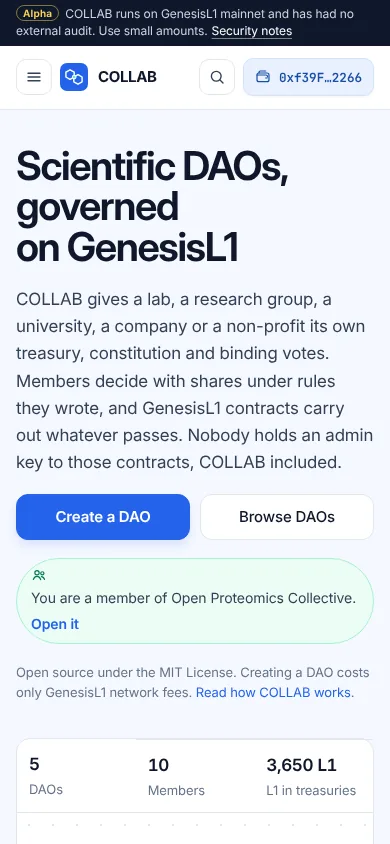
Before COLLAB is deployed
A site whose operator has installed COLLAB but not yet deployed its contracts still loads every page. Pages that read the chain say "COLLAB is not deployed on this site yet", with Open the admin page for the operator and How COLLAB works for everyone else.
The pages
Home
The home page opens with "Scientific DAOs, governed on GenesisL1", Create a DAO and Browse DAOs, and the COLLAB network: each molecule is a DAO, drawn from its address, and a bond joins two DAOs that share members, with the number of DAOs, members and L1 in their treasuries. With a wallet connected, it says which DAOs you belong to. Below come featured DAOs (the operator's choice, or the largest), Votes under way, the top tokens on DeSciFi, How a decision is made in four phases (propose, vote, wait, execute), What a DAO can hold and do, and Get started.
DAOs
DAOs on COLLAB, the directory, lists every DAO with its members, treasury, open proposals and creation date. All DAOs and Your DAOs switch between every DAO and those in which your account holds shares. Search by name, web address, share symbol or treasury address, and sort by Newest, Members or Treasury. The search and the sort stay in the address, such as /daos?q=proteomics&sort=members, so a view can be shared. A row marked Member is one of yours; Name shared marks a DAO whose name another DAO also has.
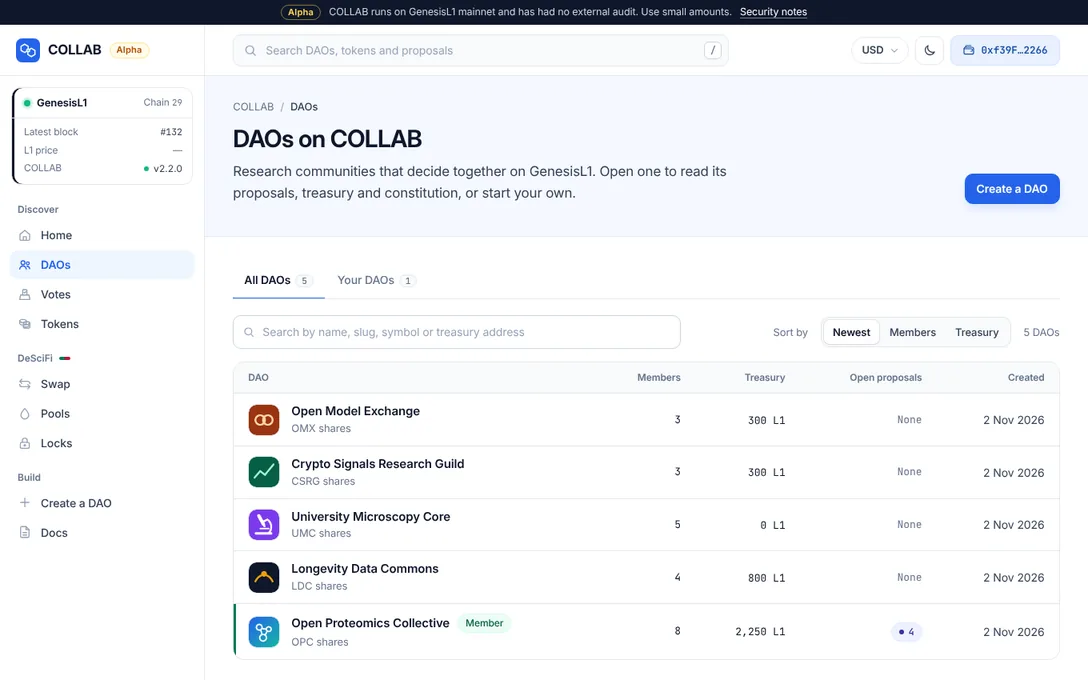
Votes
Votes across DAOs shows every proposal open in a COLLAB DAO: those being voted on first, the soonest to close at the top, then those still collecting their deposit, then passed ones waiting out their timelock or ready to execute. All open, Voting, Deposit period and Waiting to run pick a group, kept in the address as ?state=voting, deposit or waiting; ?dao=<web address> shows one DAO. It reads each DAO's 20 newest proposals, counts down the time left, and reads the list again every two minutes.
Tokens
Tokens on DeSciFi lists every token with a DeSciFi pool: its price in L1 from the pools themselves and in your display currency, its change over 24 hours, a line of its last seven days, liquidity, market cap and holders, and, for a token a COLLAB DAO issued, that DAO by its web address. Each token has its own page at /tokens/<address>, with its chart, its pools and Buy and Sell. The tokens list and token pages explains every column.
DeSciFi
DeSciFi is COLLAB's exchange, with a market look of its own: green for buying and rose for selling. Its tabs are Tokens, Swap, Pools, Add liquidity and Locks:
- Swap: a trading desk for one token, with its price chart, Buy and Sell, the route through the pools and the price impact;
/swap/<in>/<out>opens a pair, with the zero address standing for L1; - Pools: every pool, its reserves and fees, your share of it with a wallet connected, and
/pools/<pair>for one pool; - Add liquidity, at
/pools/add, to deposit into a pool; - Locks: lock boxes that hold LP tokens until a date or for good, and
/locks/<owner>for one owner's.
Tokens the site has not verified carry a plain warning. See Swap on DeSciFi and Pools, liquidity and locks.
A DAO's pages
Each DAO lives at its web address, /dao/<web address>, such as /dao/open-proteomics-collective; its treasury address also works and moves to the web address.
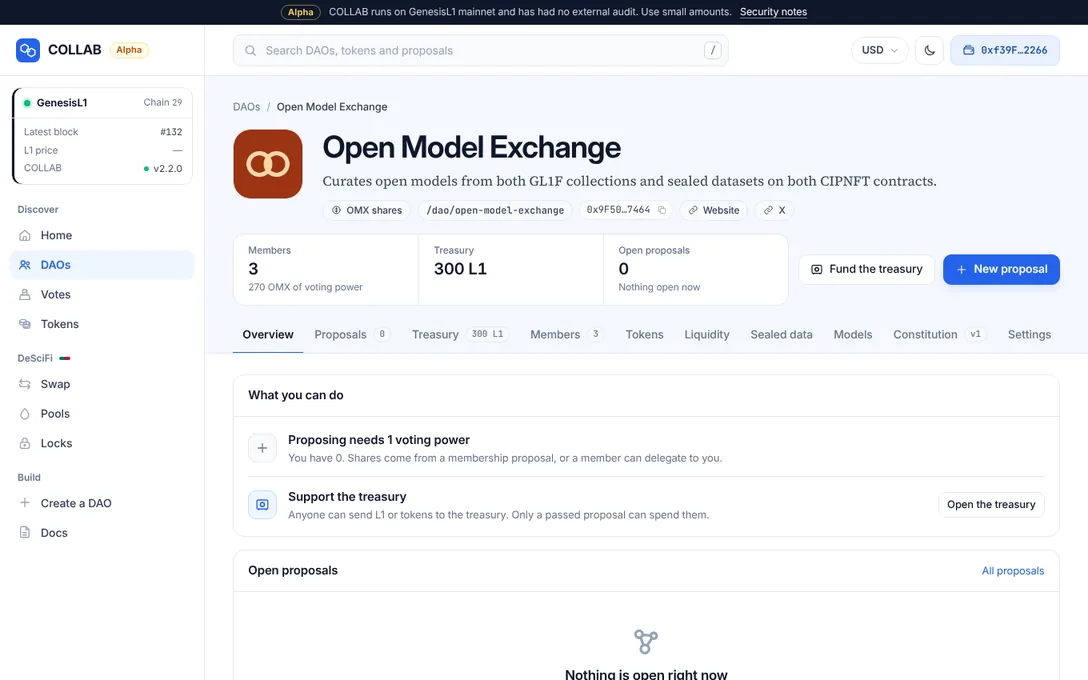
The masthead shows the DAO's logo, or its molecule; its name; the opening of its description; pills for its shares, its web address and its treasury address, with a copy button, and its links; three facts, Members, Treasury and Open proposals; and the buttons Fund the treasury and New proposal. Under it, a note says when another DAO has the same name, and when the site's operator hides the DAO from listings ("Hidden on this site.").
The section bar stays in view under the masthead as you scroll: Overview, Proposals, Treasury, Members, Tokens, Liquidity, Sealed data, Models, Constitution and Settings, some with a count. On a narrow screen it scrolls sideways, and fades where sections are cut off.
| Address | What it shows |
|---|---|
/dao/<web address> | The overview: What you can do, open proposals, recent decisions, About (the description, the constitution in force, the founding), the treasury, representatives, announcements and the DAO's contracts. |
…/proposals | Every proposal, with filters and a search by title or number. |
…/proposals/<number> | One proposal: its lifecycle, description, actions, tally, votes, and the panels to vote, deposit and execute. See Proposals and voting. |
…/propose | The composer: choose a type, build the actions, review and submit. |
…/treasury | What the treasury holds, and how to fund it. See The treasury. |
…/members | Members, their shares and delegations. See Members and shares. |
…/tokens, …/liquidity | Tokens the DAO issued, its airdrops, and its pools and locks. |
…/sealed, …/models | Its sealed data on CIPNFT and its GL1F models. |
…/constitution | The constitution in force, every earlier version and comparisons. See The constitution and announcements. |
…/settings | The rules it runs on, read from its contracts, and, for its representatives, Your representative tools. |
Beside the sections, Your membership shows your voting power, your shares and whom you vote with, with Delegate, and How decisions are made shows the DAO's rules and the smallest Yes that passes.
Create a DAO
Create a DAO is the six-step wizard. Each step has its own address, /create?step=identity and so on. See Create a DAO.
Docs
Docs is this documentation: an index of every page by group, with a search, and one page per topic at /docs/<page>. Each page is also available as plain Markdown.
Settings and privacy
Settings has the network endpoint, the block explorer, the display currency, the theme and what COLLAB keeps in your browser; see Wallets, networks and settings. Privacy and cookies lists every key COLLAB keeps in your browser, what your browser sends and to whom, and how analytics work where a site turns them on.
The admin page
The footer's Admin link leads to /admin, the page where the site's operator deploys COLLAB, publishes the deployment and changes the site settings. Everything but deploying and checking a deployment asks for the operator's admin token; members never need it. See The admin page.
A page that does not exist
An unknown address shows "This page does not exist", with links to the main pages. Addresses from the first version of the site, such as dao.html?dao=…#/proposal/3 or descifi.html#/pool/…, move to their new form when they open.
Related
- How COLLAB works: what runs in your browser, on the chain and on the server.
- Key concepts: the ideas behind the pages.
- Wallets, networks and settings: the wallet, the endpoint, the currency and the theme.
- Create a DAO: the wizard, step by step.
- Staying safe: what to check before you act.