
The admin page
The admin page, /admin, is where the operator of a COLLAB site deploys the contracts, publishes
them on the site, chooses what the site shows and watches the server. This page covers signing in,
the session, and what each of its five tabs shows. It is for the operator; apart from the Check tab,
visitors have no use for it, and search engines are told not to index it.
Opening the admin page
Open https://collab.genesisl1.com/admin, or /admin on your main host. /admin.html and
/admin/ answer 301 to /admin, and 2.1's /deploy answers 301 to /admin/deploy. nginx
serves the page from the installed release only, never from the prerender job's folders, revalidated
on every load (Cache-Control: no-cache), with X-Robots-Tag: noindex, nofollow.
The page has a masthead, a tab bar that stays under the top bar as you scroll, and the tabs:
| Tab | Address | Needs the admin token |
|---|---|---|
| Status | /admin | yes |
| Deploy | /admin/deploy | no: it runs in your browser with your wallet |
| Publish | /admin/publish | yes |
| Check | /admin/check | no: it only reads the chain |
| Site settings | /admin/site | yes |
On a narrow phone screen the last tab reads Settings.
Signing in
The admin token is a 32-character hexadecimal secret, made by the installer on its first run.
- The installer prints it at the end ("Admin token: …").
sudo collab admin-tokenshows it again at any time.sudo collab admin-token --newmakes a new one, restarts the admin service and ends every session signed in with the old one. Use it after a staff change, or when the token may have leaked.
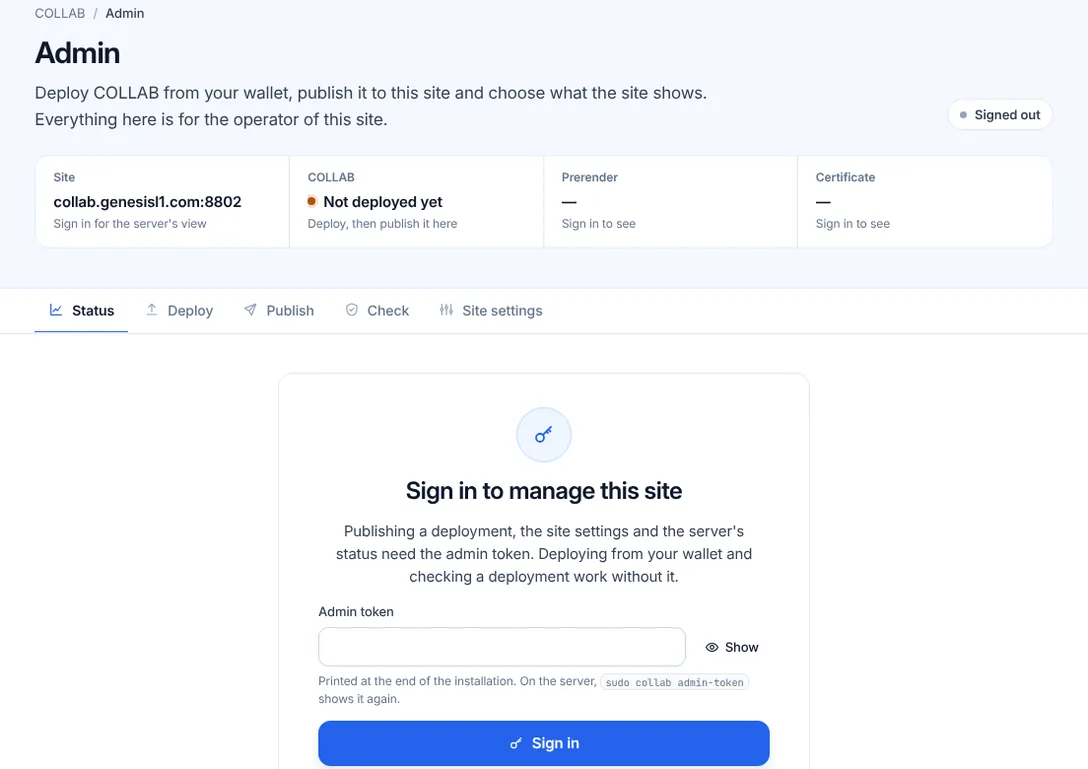
A tab that needs the token shows Sign in to manage this site. Enter the token in Admin token (Show reveals what you typed) and press Sign in.
- A wrong token is refused on its field: "That is not the admin token (sudo collab admin-token shows it)."
- The form has a fixed hidden user name, so a password manager can keep the token for this site.
- The page sends the token once, to the admin service, and never stores it. What keeps you signed in is a cookie the page itself cannot read.
The session
A session lasts 12 hours. Its cookie is HttpOnly and Secure, sent only to /admin on this site
(SameSite=Strict), and signed by the server.
- When it ends, the next request says so: "Your session has ended. Sign in again to continue. What you entered on this page is still here."
- Sign out, in the masthead, ends the session on the server at once. The sign-out is saved, so the cookie stays signed out when the admin service restarts.
- If the server could not save the sign-out (a full disk, for example), this browser is signed out
but the page says "You are signed out here, but the server could not save the sign-out." Sign out
again, or end every session with
sudo collab admin-token --new. - If the sign-out did not reach the server at all, the page stays signed in and shows "Not signed out".
Sign-in limits
- The admin service counts failed sign-ins per address (an IPv6 /64 counts as one address). After 10 failures in 10 minutes it refuses that address, even with the right token, until the oldest failure is 10 minutes old: "Too many failed sign-ins from your address. Try again in … minute(s)." The Sign in button then counts down ("Try again in" with minutes and seconds) and says "You can try again now." when the wait is over.
- nginx limits sign-ins to 6 a minute (with a burst of 10) and the whole admin API to 5 requests a second (with a burst of 40) per address. Beyond that it answers "Too many requests from your address. Wait a few seconds."
Behind a reverse proxy such as Cloudflare's, every visitor reaches nginx from the proxy's
addresses and shares their limits. Configure nginx's real_ip module for the proxy, or reach the
admin page directly.
The masthead
Beside the title, the session's state: Signed in with Sign out, Signed out, Checking the admin service, No admin service, Admin service stopped or Admin service unreachable (with Try again for the last two).
Under it, four facts about the site:
| Fact | Shows |
|---|---|
| Site | the main host, and how many other names redirect there |
| COLLAB | the published contracts' version and chain, or "Not deployed yet" |
| Prerender | the prerender job's state and when it last ran |
| Certificate | days left, "Self-signed", or "None yet", and how many names have no certificate |
Signed out, the facts say "Sign in to see" where only the server can tell.
Status
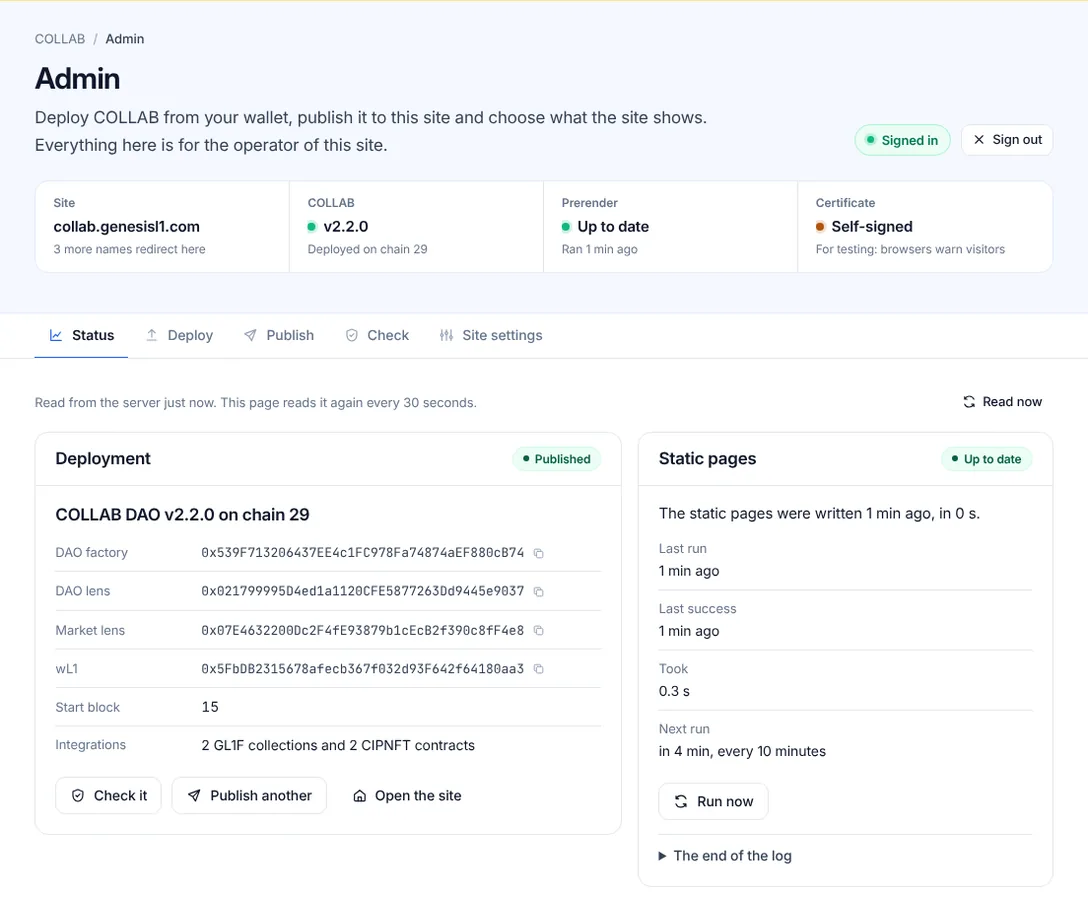
Status reads the server's state every 30 seconds while the page is visible, and every 3 seconds while a prerender run or a policy update is under way. Read now reads it at once. It has six cards.
Deployment
Before anything is published: "COLLAB is not deployed on this site yet.", the three steps (Deploy, Publish, Prerender), and Deploy COLLAB and Publish an existing deployment.
Once a deployment is published, the badge Published, its version and chain, and its DAO factory, DAO lens, Market lens, wL1, start block and integrations, with Check it, Publish another and Open the site.
Static pages
The prerender job. Its badge is one of Not run yet, Requested, Running, Up to date, Ran with warnings and Failed, with a sentence such as "The static pages were written 9 min ago, in 4 s." Then Last run, Last success, Took and Next run ("in 7 min, every 10 minutes"). Run now asks for a run at once, and The end of the log shows the job's last 200 lines (Read again reads them anew). See Static pages, data files and prices.
HTTPS certificate
The names the certificate covers, each with Valid until and Days left, and a notice for any
name without one: "One name has no certificate. … Point their DNS at this server, then run the
installer again." The badge is green with 21 days left or more, amber below that or when a name is
missing, and red below 8 days. certbot renews the certificate by itself about 30 days before it
ends, so on a healthy site the days left stay above that. A self-signed certificate
(--self-signed, for testing) shows a warning instead. See Domains, redirects and certificates.
Security policy
Whether every page carries the Content-Security-Policy that config.js needs:
| Badge | Means |
|---|---|
| In step | every page and nginx carry the policy config.js needs |
| Updating | the server is writing it into the pages and nginx; it takes a few seconds |
| Update failed | the last update was refused, by nginx's test for example, and every file was put back; the reason follows |
| Differs | the pages carry another policy; saving the settings again asks the server to update it |
The policy config.js needs shows the policy itself. See Site settings.
Server
The release and the contracts' version, the site's address and other names, the chain, the server's time (flagged when it is more than two minutes off your computer's), and the disk: free space, with a warning when less than a tenth is free.
config.js
The file every page loads first, as the server serves it, with a copy button. Its badge says Deployed or Not deployed. The server writes it; nobody edits it by hand.
Ran with warnings
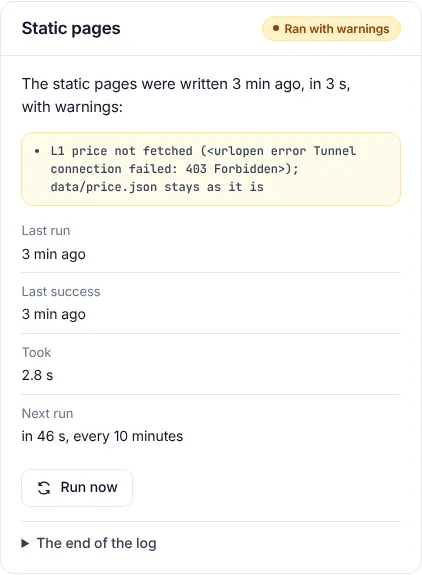
A prerender run that ends without an error but prints warnings is shown as Ran with warnings:
"The static pages were written 3 min ago, in 3 s, with warnings:", then the warning lines, at most
20. The pages and images were written; something extra was not refreshed. The masthead's Prerender
fact turns amber, and sudo collab status prints "ran with warnings" with the same lines.
The usual warnings:
- "L1 price not fetched (…); data/price.json stays as it is": the server could not reach CoinGecko.
- "tokens not read (…); data/tokens.json and the token pages stay as they are": the token data could not be read from the chain this time.
- "member network not read (…); og/network.json and the member cache stay as they are".
A failed run shows Failed, its error line, and the warnings of that run under it; the pages of the last good run keep being served. See Troubleshooting.
Deploy
The Deploy tab deploys the 20 contracts of this release from your browser wallet, one transaction each, verifies them against this release and, signed in, publishes them on this site in its last step. It works without the token, so you can deploy before you sign in. See Deploy the protocol from /admin.
Publish
The Publish tab shows the deployment this site publishes now, with Unpublish, and publishes an existing deployment: from its deployments file, pasted, or read from the chain by its DAO factory's address. Every record is checked on chain before Publish to this site unlocks. See Publish, unpublish and check.
Check
The Check tab reads a deployment back from the chain and compares it with this release: this site's own configuration, or any deployments file. It needs no token, so anyone can confirm which contracts a COLLAB site points at. See Publish, unpublish and check.
Site settings
Seven cards (Notices, DAOs, Tokens, Search engines, Links, Analytics and Network), each with a preview of what changes on the site, and a save box with Save changes and Discard changes. See Site settings.
When the admin service is not there
The page tells apart why a tab that needs the server cannot work:
- This site has no admin service. The site is served as static files. Deploy and Check work all the same, and the Deploy tab gives you the files to publish by hand. See Hosting without the server kit.
- The admin service is not running. nginx answers for a stopped service. On the server,
sudo systemctl restart collab-adminstarts it andsudo collab logsshows why it stopped. - The admin service could not be reached. The request did not get through; check your connection, then reload the page.
The Admin API reference documents the requests behind the page.