
Proposals and voting
Everything a DAO does starts as a proposal. This page follows one from submission to execution: the deposit, the vote and how it is counted, delegation and the holding period, the timelock and the execution window, and the composer that builds and checks a proposal before it reaches the chain. It is for members who propose, vote or execute. What each type of proposal may do is on The 13 proposal types, and the rules a DAO can set are on Governance rules and presets.
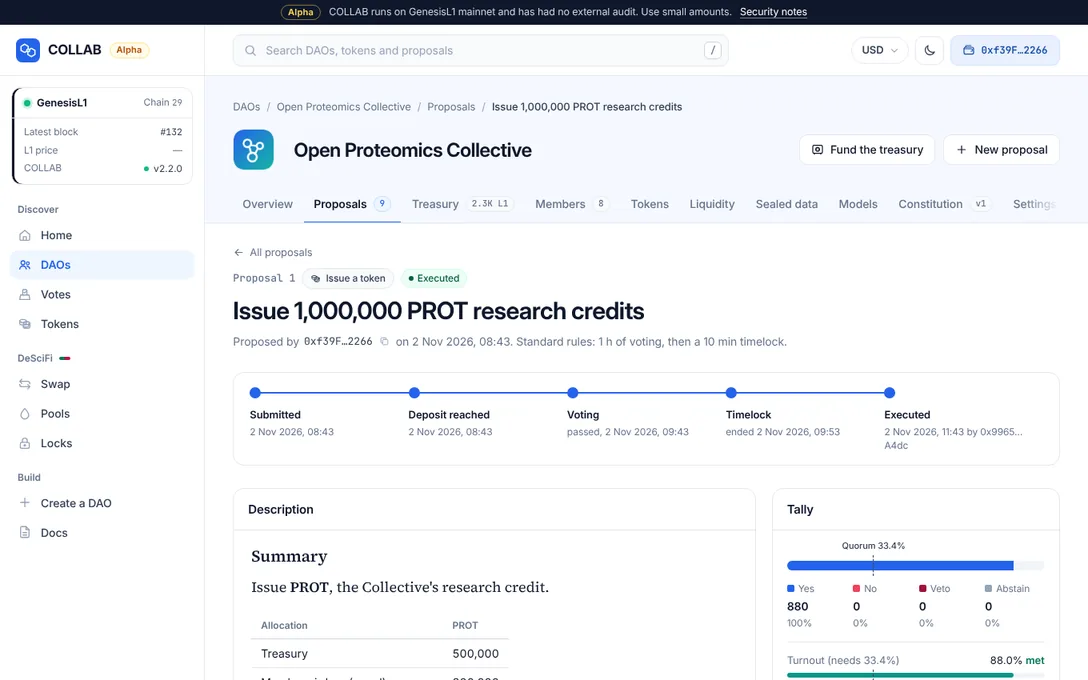
The life of a proposal
A proposal has a type, a title, an optional description in Markdown, and its actions: the exact calls the treasury makes if the proposal passes. When the proposal is submitted, the governor stores a fingerprint of the actions (their keccak256 hash), and execution runs only actions that match it. What executes is exactly what members voted on.
Submit
You choose a type, write a title and an optional description, add the actions and pay part of the deposit:
- the title takes 1 to 200 bytes of well-formed text: the governor refuses broken UTF-8 and the control characters below the space other than tabs and line feeds;
- the description takes up to 64 KB (65,536 bytes) and is stored on-chain in TextStore with the proposal;
- a proposal has at most 32 actions, and a Signal has none;
- you need at least the DAO's proposal threshold in voting power, counted as described under Who can vote, and your account must not be frozen;
- you pay at least the DAO's initial share of the minimum deposit, in L1.
The DAO's call policy checks every action against the proposal's type and decides whether the standard or the critical rules apply; Governance rules and presets says how. The rules that apply are copied into the proposal, so a later change of the DAO's rules never affects a proposal already submitted.
Deposit period
If the deposits already reach the DAO's minimum, voting starts at once. Otherwise anyone can add L1 in the Deposit panel of the proposal's page, and voting starts the moment the total reaches the minimum. If the total stays below the minimum until the deposit period ends, the proposal ends as Deposit expired. Until voting starts, the proposer can withdraw it with Withdraw this proposal.
Voting
Members vote Yes, No, No with veto or Abstain in the Your vote panel and can change their vote until the voting period ends. Deposits can still be added during the vote. When voting ends, the result is fixed: Passed, Rejected, Vetoed or No quorum. How votes are counted explains the tests.
Timelock and execution window
A passed proposal with actions waits out the timelock of its rules. Nobody can stop it during that time; the timelock is warning time, so everyone can see what will happen before it does. Then it is Ready to execute for the length of the DAO's execution window, and anyone can execute it. If nobody does before the window closes, it ends as Execution window closed and none of its actions run.
A Signal carries no actions. It ends when voting ends, and a passed Signal is the DAO's recorded decision: it shows as Passed, with no timelock and nothing to execute.
What each status means
Proposal pages, the DAO's Proposals list and /votes show these statuses:
| Status | Meaning | Deposits |
|---|---|---|
| Deposit period | Waiting for the minimum deposit. Anyone can add L1. | Not settled yet |
| Voting | Members are voting and can change their votes. | Not settled yet |
| Passed | A Signal passed. Nothing executes; the result is the record. | Refunded |
| Timelocked | Passed and waiting for the timelock to end. | Refunded |
| Ready to execute | Anyone can execute it until the execution window closes. | Refunded |
| Executed | The treasury ran every action. | Refunded |
| Rejected | Quorum was met, but Yes did not pass the threshold or reach the minimum Yes. | Refunded, unless it was a freeze proposal under the freeze bond |
| Vetoed | No with veto went above the veto threshold. | Forfeited if the DAO forfeits vetoed deposits |
| No quorum | Too few votes were cast. | Forfeited if the DAO forfeits them, or if it was a freeze proposal under the freeze bond |
| Deposit expired | The minimum deposit was not reached in time. | Forfeited if the DAO forfeits deposits that never reach the minimum |
| Execution window closed | Passed but never executed. Nothing happened. | Refunded |
| Withdrawn | The proposer withdrew it before voting started. | As for Deposit expired |
The Proposals list filters them as Open, Voting, Deposit, Passed, Rejected, Failed or expired, Withdrawn and All.
Who can vote
Shares are voting power: one share, one vote, counted down to the smallest unit. Shares held by the treasury never vote and do not count towards quorum, and neither do the shares of frozen members or of accounts the DAO has excluded as infrastructure, such as a pool that holds shares. Members and shares covers shares, freezes and exclusions.
Snapshots
Voting power is recorded block by block. Each proposal looks at the block just before it was submitted, its snapshot. The shares and delegations at that block decide who can vote and with how much, and the total voting power at that block is the base for quorum.
- Shares bought, received or delegated after the snapshot count only for later proposals, so borrowing or buying shares to swing an open vote does not work.
- A change of delegate counts for proposals submitted from the next block on, or, in a DAO with a holding period, once that period has passed.
- A member frozen while a vote is open can no longer vote or change their vote, though a vote they already cast still counts. The snapshot does not change: their shares stay in that proposal's quorum base, and a delegate who held them at the snapshot can still vote with them.
Delegation
You vote with your own shares by default; there is nothing to activate. You can delegate to another member, who then votes with your shares as well as their own, with Delegate on a DAO's page (Members and shares shows where). You cannot delegate to the treasury or to a frozen member, and a frozen member cannot delegate.
As on GenesisL1, your own vote always wins for your shares. If you vote after your delegate, your shares are taken out of their vote and counted with yours. If you vote first, your delegate votes only with the rest.
Example. Ana holds 100 shares and delegates to Ben, who holds 50. If Ben votes Yes, he votes with 150. If Ana then votes No, Ben's Yes drops to 50 and Ana's No counts 100. Had Ana voted first, Ben would have voted with 50 from the start.
Delegation goes one level deep: your delegate votes with your shares but cannot pass them on to someone else. The Votes list on a proposal's page shows the weight each vote was cast with. A delegate's weight can fall afterwards, when their delegators vote for themselves; the tally is always exact.
The holding period
A snapshot alone would let someone buy shares just before a proposal and decide it. A DAO can therefore set a holding period. With a holding period of N blocks, each proposal reads voting power at two moments, its snapshot and N blocks earlier, and the lower reading counts. That applies to your own shares, to the votes delegated to you and to the proposal threshold.
- Two moments, not every block. The rule compares two readings; it does not prove that shares stayed in one account all the time between them. Shares sent away and back inside the window count, because they are there at both readings. Nothing can be counted twice: whoever held shares at only one of the two readings gets no weight for them, so moving shares between accounts inside the window adds no votes.
- Defaults. DAOs created with transferable shares start with 7,200 blocks, about 28 hours at GenesisL1's average of 14 seconds per block. DAOs whose shares cannot be transferred start without one.
- Founders. The earlier reading never goes back before the block in which the DAO was created, so founders can vote from the start.
- Order never matters. When you vote yourself, your shares are taken out of your delegate's votes separately at each reading, whoever your delegate was at that reading, and a delegate keeps the lower of its two readings after that. The order in which members and delegates vote never changes the result.
- Shares that changed hands. Shares that moved within the window carry no weight for the seller or the buyer on that proposal, though they still count in its quorum base. Either of them can still vote with a weight of 0, which only takes those shares out of their delegate's votes. The proposal page says so: "Your shares changed hands inside the holding period, so they carry no weight here. Voting still takes them out of your delegate's vote."
- No shares at either reading. Such an account cannot vote unless it still has delegated votes to cast.
Example. Ana has held 100 shares for months. An hour before a proposal is submitted, she delegates them to Ben, who holds 50. Ben's earlier reading does not include Ana's shares, so on that proposal he votes with his own 50, and Ana's 100 count only if she votes herself. Whichever of them votes first, Ben keeps his 50 and Ana votes with 100.
A proposal's page states the two blocks: "Holding period: vote weight is the lower of the shares held at block … and at block …". The holding period itself is a setting of the DAO, up to 2,250,000 blocks (about a year) and never 0 while shares are transferable; see Members and shares.
How votes are counted
The tally uses the rules copied into the proposal at submission, and all voting power at the snapshot as its base.
Yes, No, No with veto and Abstain
The Your vote panel has four buttons: Yes, No, No with veto and Abstain. Each sends your vote from your wallet at once, and you can change it until voting ends.
- Abstain counts towards quorum and towards the veto share, but neither for nor against the proposal.
- No with veto counts as a No in the pass test and also in the veto test. Use it for proposals that are harmful or abusive, not for proposals you merely dislike.
The three tests
When voting ends, three tests run in this order.
- Quorum. The votes cast, all four options together, must be at least the quorum share of all voting power at the snapshot. If not, or if nobody voted, the result is No quorum.
- Veto. If No with veto is more than the veto threshold share of all votes cast, Abstain included, the result is Vetoed, however many Yes votes there are.
- Pass. Yes must be more than the pass threshold share of the votes that are not Abstain (Yes, No and No with veto). Exactly at the threshold is not enough. If everyone abstained, the result is Rejected. Where the DAO sets a minimum Yes, Yes must also reach that share of all voting power at the snapshot, or the result is Rejected too.
A pass threshold of 100% means unanimity: the proposal passes only if every vote that is not Abstain is Yes.
A worked example
There are 1,000 shares of voting power at the snapshot. The votes: 420 Yes, 150 No, 60 No with veto and 70 Abstain, 700 in total. Here are the same votes under standard rules of 33.4% quorum, 50% pass and 33.4% veto, and under critical rules of 40% quorum, 66.67% pass and 33.4% veto:
| Test | Share | Standard rules | Critical rules |
|---|---|---|---|
| Quorum: votes cast of all voting power | 70% (700 of 1,000) | Met, needs 33.4% | Met, needs 40% |
| Veto: No with veto of all votes cast | 8.6% (60 of 700) | Not vetoed, limit 33.4% | Not vetoed, limit 33.4% |
| Pass: Yes of the votes that are not Abstain | 66.67% (420 of 630) | Passes, needs more than 50% | Fails, needs more than 66.67% |
| Result | Passed | Rejected |
420 of 630 is exactly two thirds, 66.666…%, which is just below a 66.67% threshold; one more Yes vote would have passed it. Every proposal page draws its tally this way, with dashed lines for the quorum and the thresholds.
Abstentions and the minimum Yes
Abstain counts towards quorum but not in the pass test. So when everyone else abstains, any Yes at all passes, even a fraction of a share: the abstentions meet quorum, and Yes is all of the votes that are not Abstain. A minimum Yes closes that gap: Yes must then also reach that share of all voting power at the snapshot, however many members abstain. A proposal that meets quorum and the pass threshold but not the minimum Yes is Rejected.
Example. Under the standard rules above, 334 of the 1,000 shares vote: 1 Yes and 333 Abstain. Quorum is met, nothing is vetoed and Yes is all of the votes that are not Abstain, so the proposal passes on a single share. With a minimum Yes of 10%, it needs at least 100 Yes votes, and it is Rejected.
The minimum Yes is 0% (none) unless the DAO sets one; it can be at most 50%, and the critical rules can never ask for less than the standard ones. Every preset of the creation wizard sets one. A minimum above the share of voting power members actually use would block every proposal, so set it with turnout in mind. The card How decisions are made, beside a DAO's pages, states the smallest Yes that passes its standard and its critical votes when everyone else abstains.
Deposits, refunds and penalties
Deposits are paid in L1, not in shares. They keep spam out and show that someone is willing to put money behind a proposal.
- The minimum deposit is what a proposal needs before voting can start. The proposer pays at least the DAO's initial share of it when submitting: with the Standard preset, 25% of a 10 L1 minimum, so 2.5 L1. Anyone can add the rest.
- Deposits can be added during the deposit period and during voting.
- A minimum of 0 sends every proposal straight to a vote.
Refunds
Each depositor reclaims their own deposit once voting is over, unless the DAO's rules forfeit it, with Reclaim your … deposit in the Deposits and follow-up panel of the proposal's page. Refunds open as soon as voting ends, even while a proposal waits in its timelock. Deposits on proposals that passed, were rejected or executed, or whose execution window closed, are refunded, apart from the freeze bond below.
When deposits are forfeited
Like Cosmos SDK governance, which GenesisL1 uses, a DAO can forfeit deposits in three separate cases, each switched on or off in its rules:
- the proposal never reached its minimum deposit, which includes a proposal its proposer withdrew;
- the vote missed quorum;
- the proposal was vetoed.
COLLAB adds a fourth case, the freeze bond: a proposal to freeze a member that is rejected or misses quorum forfeits its deposits, so a failed attempt to freeze someone costs those who backed it. Every preset of the creation wizard turns it on; Members and shares explains it with the freeze lock.
Forfeited deposits go to the burn address (0x…dEaD) or, if the DAO chose so, to its own treasury. Anyone can settle a forfeited deposit with the button Send … to the treasury (or to the burn address), and the whole amount moves at once. A DAO's Settings section lists the cases that apply under Deposits and timing, and the composer states them in its Deposit step before you submit.
Execution
Anyone can execute
Once the timelock is over, the proposal page's Execution panel says: "This proposal passed and its timelock is over. Anyone may execute it until …: the treasury runs the actions listed here, and whoever executes pays only the gas." Before you press Execute proposal, the page checks that every action still succeeds against the current chain state, and just before sending it reads the proposal's state again, so a proposal someone else has just executed is not sent twice ("#… was just executed by someone else. Nothing was sent.").
When execution fails or expires
The treasury runs the actions in order and all together. If one fails, none take effect, and the proposal stays ready to execute: anyone can try again later in the window, for example once the treasury holds enough of a token. If the window closes first, nothing happens.
Whoever executes chooses the moment within the window, and the order when passed proposals conflict. A swap or a liquidity change can execute at exactly the minimum amount it was submitted with, so set that minimum to what the DAO really accepts. Known limitations lists these timing effects.
Large executions
A proposal that writes a large logo or description into the DAO's profile can need more gas than RPC nodes estimate (they stop at 25 million). The page then says "Not simulated: too heavy for RPC nodes.", checks the image or the text in the browser the way the contract checks it, and Execute proposal sets the gas limit itself. On GenesisL1 a transaction that fails still pays at least half its gas limit, so the panel states what a failed execution would cost; see Costs and gas. Near the largest logo and description, even submitting such a proposal passes that limit: the review then says "Submitting it takes about … million gas, more than nodes estimate, so COLLAB sets the gas limit itself." and what a failed submission would cost.
Writing a proposal
The composer
New proposal, at the top of every DAO page, opens the type picker at /dao/<web address>/propose. The types are grouped as Decide and record, Funds and liquidity, Members and representatives, Tokens, Research assets and Rules and advanced. Each card states the rules it votes under, such as "Standard rules: Yes over 50%", "Critical rules: Yes over 66.67%", or, where treasury spends are critical, "Standard, or critical when an action can move treasury value".
The composer then has four numbered steps:
- What should it do? Choose what the proposal does among the type's actions (its builders) and fill in the form. Add another action: adds more, up to 32. A Signal has The decision instead: no actions.
- Write-up. The Title and the Description members read before they vote. They cannot be edited after submission. The review suggests a title from the first action when you leave it empty.
- Deposit. What you pay now, at least the initial share, and what happens to deposits under the DAO's rules.
- Review and submit. A checklist of actions, title, description, deposit and review, then Review proposal and Submit proposal.
Copy a link to this draft copies a link that opens the composer with the same type, first action and write-up, so you can pass a draft to someone else to submit. The link carries the description only when it is at most 2,000 bytes; send a longer one separately. Nothing reaches the chain until you submit.
The review panel
Review proposal builds the actions and checks them before anything is sent:
- The call policy. The DAO's own policy contract checks every action: "Allowed for … proposals." with "Standard voting rules apply." or "These calls make it a critical proposal: the stricter rules apply.", or a rejection that names the reason ("The DAO's call policy rejects this: …").
- The simulation. The whole batch runs against the current chain state; see Simulation.
- What executes if it passes, in order. Each action in plain language, with a warning where something deserves attention, and Raw actions (JSON) for the exact calls. Recipients and spenders are named only when they are addresses COLLAB knows, such as this DAO's contracts, COLLAB's protocol contracts and the burn address; any other contract shows its address, whatever name or symbol it gives itself.
- Rules that apply. Standard or critical, the voting time, quorum, what it passes with, the smallest Yes, the veto, the execution and, where the DAO has one, the holding period.
- Deposit. What you deposit now and when voting opens.
Submit proposal unlocks only after a review that passed. Any change to the inputs afterwards says "Inputs changed. Review again before submitting." Once submitted, a proposal page checks again that the actions it shows match the on-chain fingerprint ("These … actions match the proposal's on-chain commitment"), and through your wallet's network too when a wallet is connected, so an RPC endpoint cannot show you different actions from those that will execute.
Simulation
A simulation runs the actions as an eth_call, which costs nothing and changes nothing. Its result carries one of these labels:
| Label | When | What it means |
|---|---|---|
| Simulation passed (approximate) | Composing, or a proposal not yet ready to execute | The batch ran from the governor without the proposal's own execution context. An airdrop counts the previous block's members instead of the snapshot's, a constitution version records no proposal, and the key vault's records keep no proposal number. |
| Simulation failed now (approximate) | The same | A call reverts now. That can be expected when an action depends on something that happens first, but check before submitting. |
| Every action succeeds against the current chain state | A proposal ready to execute | The governor's own execution was simulated, exactly as executing it would run. |
| Execution would fail now | A proposal ready to execute | Executing it now would revert, with the reason. |
| Not simulated: too heavy for RPC nodes | Profile writes over about 20 million gas | Checked in the browser instead; execution sets its own gas limit. |
On a proposal that is open but not yet ready to execute, Simulate execution now runs it again. Balances, prices and approvals can still change before execution.
Related
- The 13 proposal types: what each type may do, and when it is critical.
- Governance rules and presets: quorum, thresholds, periods and deposits, and how to change them.
- Members and shares: shares, delegation in the Members section, freezes and the freeze bond.
- Costs and gas: network fees, deposits and the cost of a failed transaction.
- Staying safe: what to check before you vote or execute.