
Wallets, networks and settings
COLLAB is a website that reads GenesisL1 in your browser and sends transactions through your own wallet. This page explains how it connects to a wallet and to the chain, what each setting in Settings does, what the site keeps in your browser, and how to start safely. It is for anyone who uses the site. You need no account, and you need no wallet to browse.
Connecting a browser wallet
Every DAO, vote and token can be read without a wallet: "A wallet is needed only to vote, deposit, propose or trade on GenesisL1." Connect wallet in the top bar finds the wallets your browser offers. With several installed, Choose a wallet lists them and marks the one you used last; with none, the site suggests a browser wallet such as MetaMask, Rabby or Keplr in EVM mode.
Once you approve the connection, COLLAB asks your wallet to switch to GenesisL1, chain 29. If the wallet does not know that network yet, it asks you to add it with these values:
| Field | Value |
|---|---|
| Network name | GenesisL1 |
| Chain ID | 29 |
| Currency | L1, 18 decimals |
| RPC URLs | the site's https endpoints: by default https://rpc.genesisl1.org and https://gl1x.com/api/eth-rpc |
| Block explorer | the site's default explorer: by default https://gl1x.com |
If your wallet stays on another network, the site says "Switch your wallet to GenesisL1 (chain 29)", and the top bar shows Switch to GenesisL1 in place of your address. Before every transaction COLLAB checks the wallet's network again, and every transaction it sends carries chain ID 29, so it cannot be replayed on another chain.
On later visits the site reconnects the wallet you used last without asking, as long as the wallet still allows this site. Disconnect in the wallet menu forgets that choice and asks the wallet to revoke the site's access, where the wallet supports it.
Accounts
The site acts for the account your wallet has selected, and follows it when you switch accounts in the wallet. Your address in the top bar opens the wallet menu: Connected account, the network, the full address with a copy button and an explorer link, My DAOs and Disconnect. My DAOs opens the directory's Your DAOs tab, the DAOs in which this account holds shares.
Most actions are transactions you confirm in the wallet. Two features also ask for a signature, which sends nothing and costs nothing:
- your encryption key for sealed data is derived from your signature of a message titled "COLLAB member encryption key" and kept in memory only; registering its public part in the COLLAB keyring is then one transaction (Sealed data with CIPNFT);
- running a paid GL1F model with your access signs the request as typed data (Models with GL1F).
Keys derived in the browser are dropped when you switch accounts or leave the page.
RPC endpoints
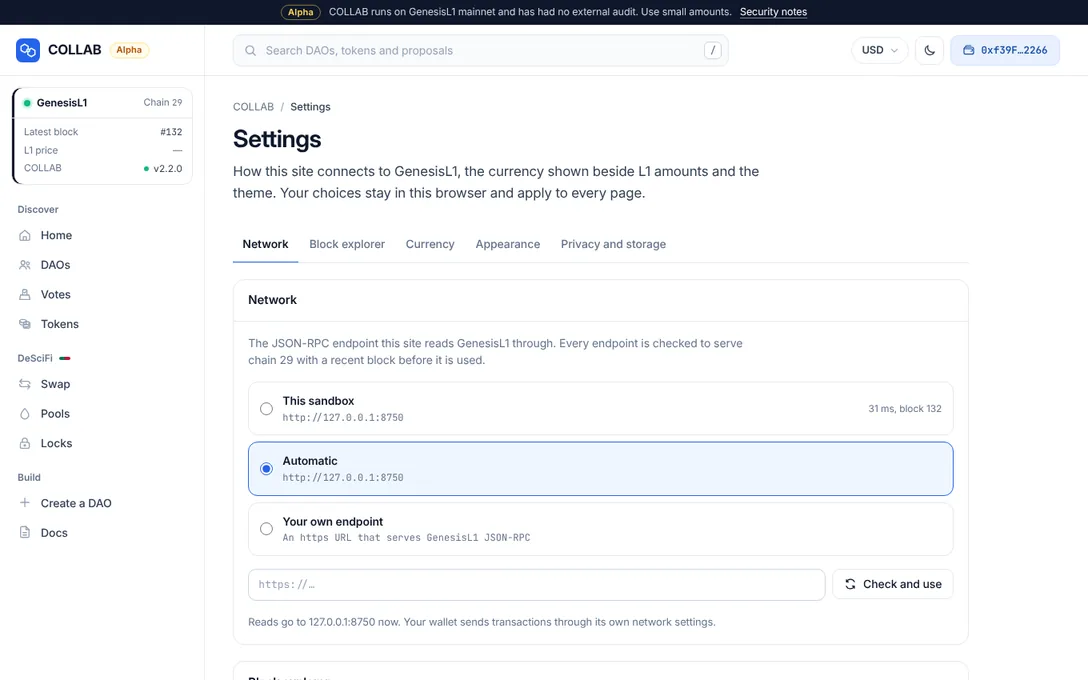
The site reads the chain through a JSON-RPC endpoint. Settings, under Network, offers the endpoints the site lists, each with the time it took to answer and its latest block, measured from your browser, or "Not answering":
- each listed endpoint, by default GenesisL1 RPC (
https://rpc.genesisl1.org) and GL1X JSON-RPC (https://gl1x.com/api/eth-rpc); - Automatic, the default: "The endpoints above, in order, moving on when one fails";
- Your own endpoint, where the site allows it.
For your own endpoint, enter its address and press Check and use. It must be an https address, or http for a node on your own computer (127.0.0.1 or localhost). Before saving it, COLLAB checks that it answers within 8 seconds, serves chain 29 ("This endpoint serves chain …, not GenesisL1 (29).") and returns a block less than 15 minutes old, so it is in sync. A passed check reads "Chain 29, block …, … ms. Saved: reads now go to …". The browser may fail to reach an endpoint that is offline, refuses requests from other sites (CORS), or is outside the site's security policy; the message says so, and nothing is saved. A site whose operator allows only its own endpoints says "This site uses its own endpoints only."
The chain is checked again every five minutes and after every switch. If an endpoint starts answering for another chain, the site says "Your RPC endpoint is on another network", and nothing can be sent until you choose another endpoint.
Your wallet sends transactions through its own network settings, not through this endpoint, and COLLAB does not take the endpoint's word where it matters: before a transaction goes to a DAO's contracts, it reads the DAO's addresses again through your wallet's network, and sends nothing if they differ ("Your RPC endpoint reports different contracts for this DAO than your wallet's network does, so nothing was sent."). A proposal's actions and the keys data is sealed to are checked the same way. An endpoint you choose still sees your IP address and what you look up.
The network card at the top of the sidebar shows the chain and the latest block, and its dot whether the endpoint is live, slow or not reachable, as its tooltip says; it links to these settings.
The block explorer
Under Block explorer, choose where links to transactions and addresses open: the site's default, GL1X (https://gl1x.com) unless the operator chose another, or Another explorer, any https explorer whose pages are at /tx/<hash> and /address/<address>, saved with Use this explorer.
The display currency
Amounts stay in L1, with their value in a display currency beside them for reference, such as "≈ $217". Nothing you send on-chain is computed from these prices.
- The default. Until you choose, the value is in US dollars, from the L1 price the site's own server publishes. The server fetches it from CoinGecko every ten minutes for everyone at once, so your browser contacts no price service. A published price more than a day old is not used, and amounts then show in L1 only; so do sites hosted without COLLAB's server kit, which publish no price.
- Your choice. Under Currency in Settings, or from the currency button in the top bar ("Show amounts in"), choose L1 for L1 only, or one of 20 currencies: the US dollar, euro, British pound, Swiss franc, Japanese yen, Chinese yuan, South Korean won, Indian rupee, Russian ruble, Ukrainian hryvnia, Turkish lira, Polish złoty, UAE dirham, Canadian dollar, Australian dollar, Brazilian real, Singapore dollar, Hong Kong dollar, bitcoin and ether. Once you choose one, the US dollar included, your browser fetches that price itself from the site's price service, CoinGecko unless the operator chose another, at most every five minutes.
- Prices off. A site's operator can turn prices off; amounts then show in L1 only.
The network card's L1 price shows the price in use, with its source and time when you point at it.
The theme
Under Appearance: System ("Follows your device, light or dark"), Light ("White windows, as on genesisl1.com") or Dark ("The GenesisL1 dark theme"). The moon or sun button in the top bar switches between light and dark. On phones, the menu drawer has the currency and the theme.
What stays in your browser
Settings and conveniences stay in this browser's local storage under keys that start with collab-. None of them holds a secret, and they never leave your device:
| Key | What it holds |
|---|---|
collab-theme | Your theme: System, Light or Dark. |
collab-rpc | The network endpoint you chose. Absent while the choice is automatic. |
collab-explorer | The block explorer that links open. Absent while it is the default. |
collab-currency | The currency you chose. Absent until you choose one. |
collab-price | The last L1 price this site published, or the last one fetched for your currency, and when. |
collab-cookie-info | When you closed the cookie notice, so it is not shown again. |
collab-consent | Your analytics choice and its date, where the site has analytics. |
collab-wallet | Which wallet you connected last, so the site can reconnect it without asking. |
collab-tokens | Token addresses you added to your token lists. |
collab-descifi | Your DeSciFi slippage tolerance and transaction deadline. |
collab-create-draft | Your unfinished DAO in the creation wizard. |
collab-sealed-key-version:… | Which version of your sealed-data key you registered. The key itself is never stored. |
collab-deploy:… | Progress of a protocol deployment in the admin page's Deploy tab. No keys or secrets. |
For the length of a visit, the tab's session storage also keeps the DAOs' names and web addresses as read from the chain (collab-dao-names:…), so shared names can be flagged without reading every DAO again; it is gone when the tab closes.
Privacy and storage in Settings says how many items COLLAB keeps now, opens Cookie settings, and offers Remove COLLAB data from this browser, which deletes all of them after asking; nothing on the chain changes, and your wallet keeps its accounts. The privacy page describes the same keys, what your browser sends and to whom, and the cookie notice.
First steps with small amounts
COLLAB 2.2 is an alpha: "COLLAB runs on GenesisL1 mainnet and has had no external audit. Use small amounts." A careful start:
- Use the real site. Open the site at its own address, and bookmark it. COLLAB never asks for your seed phrase or private key; nothing on the site needs one.
- Check the network card. It should show GenesisL1, chain 29, and a recent block.
- Read before you sign. The site describes every action in plain words before it opens your wallet, and the wallet shows what you actually sign. A transaction that fails on GenesisL1 still pays at least half its gas limit, and the site states that cost for its larger transactions.
- Start small. Make a small deposit or a small swap first, and keep some L1 for network fees.
- Identify DAOs by their web address. Names are not unique; the
/dao/…address is.
Staying safe goes further: copycat DAOs, unverified tokens and phishing.
Related
- A tour of the site: every page and the shell around it.
- Staying safe: what to check before you act.
- Costs and gas: network fees, and what a failed transaction costs.
- How COLLAB works: the static site, the RPC endpoint and the wallet.
- Privacy and cookies: the site's privacy and cookie policy.