
Swap on DeSciFi
DeSciFi is the exchange built into COLLAB, so the tokens of research communities can trade from the day they are issued and the DAOs behind them earn the trading fees. This page is for anyone who buys or sells there with their own wallet. It explains the trading desk, where quotes and routes come from, what price impact, slippage and the deadline protect you from, how L1 and wL1 relate, what "verified" means and why some tokens ask for a check, and what to do when a swap fails. DAOs trade by proposal instead; see Pools, liquidity and locks.
The trading desk
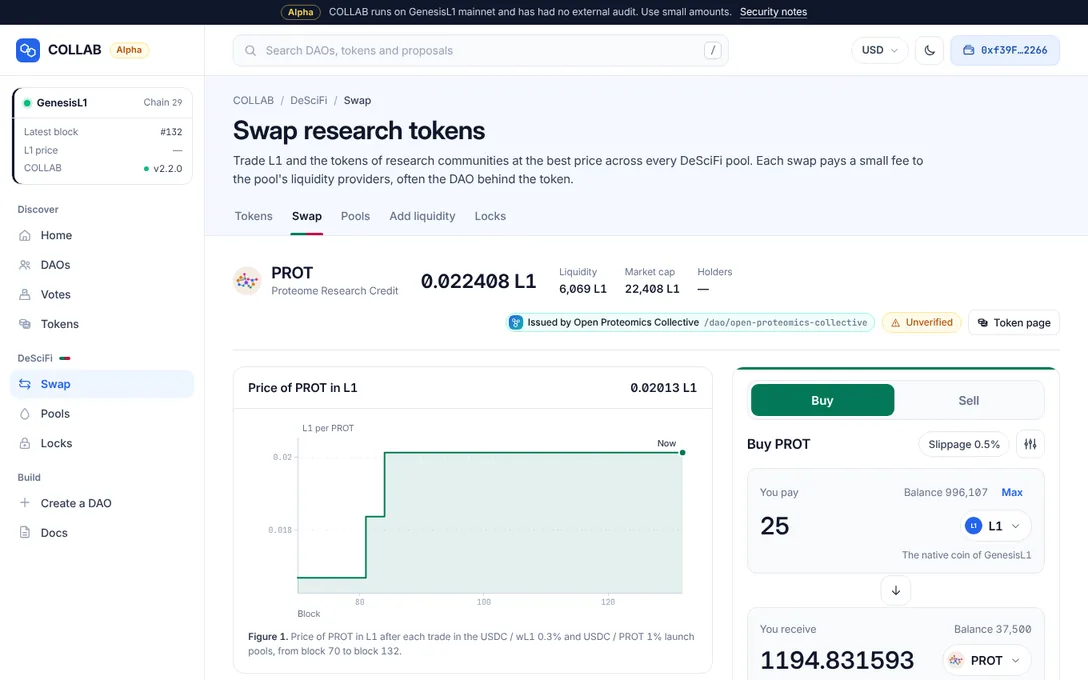
Open Swap under DeSciFi in the sidebar, or press Buy or Sell next to a token in the tokens list. The page, "Swap research tokens", has tabs for Tokens, Swap, Pools, Add liquidity and Locks. A swap link has the form /swap/<token you pay>/<token you receive>, with the zero address standing for L1.
The desk has four parts:
- The market head: the token's price in L1, its 24-hour change, Liquidity (the value of both sides of every DeSciFi pool that holds it), Market cap (the pool price times the total supply), Holders, the DAO that issued it, whether this site verifies it, and a link to its Token page.
- The price chart: the token's price after each trade, along the pools of the route.
- The ticket, where you trade.
- Route and About these tokens: the path the trade takes, with the fee at every pool and who earns it, and facts about both tokens, including your balances.
Buy and Sell
The ticket is a buy when you receive the token, paying L1 or another token, and a sell when you receive L1. The Buy and Sell switch at its top swaps the two sides, and the ticket's edge and main button take the market's colours: green for buying, rose for selling. Its title says what you are doing: Buy or Sell and the token's symbol, or Wrap L1 and Unwrap wL1 when the two sides are L1 and wL1.
- Under You pay, choose the token you pay with and enter the amount. Max fills in your whole balance; when you pay in L1, it keeps 0.02 L1 back for the network fee.
- Under You receive, choose the token you want. The token picker searches by symbol, name or address, and you can paste the contract address of any ERC-20 token. The arrow between the fields switches the two tokens.
- Read the terms (below). If the ticket asks you to check a token's address, do it first; see The link check.
- Paying with a token rather than L1 needs an approval first: "First allow the DeSciFi router to take … from your wallet for this swap." Approve … approves exactly that amount. The Approve an unlimited amount switch lets the router move all of that token from your wallet, now and later, without asking again: approve the exact amount unless you trade often.
- Press Swap … for … and confirm in your wallet.
The main button says what is missing when it cannot trade yet: Choose a token, Enter an amount, Connect wallet, Not enough …, Finding the best price… or Check the token address first.
Quotes and routes
Quotes come from the pools themselves. Your browser reads every DeSciFi pool through your RPC endpoint; no COLLAB server sees your trade.
- While you type, an estimate from the pools already read appears at once. Shortly after, the DeSciFi router's own calculation on chain confirms it, and only a confirmed quote can be signed. Both are redone on every new block.
- The ticket quotes an exact amount in: you pay exactly what you entered and receive at least the minimum.
- Routes. Every path of up to four pools is compared, and the best one wins. A route can pass through standard pools and launch pools, and through tokens in between: the Route card shows what you pay, the amounts in between and what you receive, and the fee each pool takes "to its liquidity providers", often a DAO's treasury.
- Fees. Each pool on the route takes its fee tier from the trade's input: 0.10%, 0.30% or 1.00% in a standard pool, 0.30% or 1.00% in a launch pool. The fees go to the pool's liquidity providers. COLLAB takes no fee of its own.
- Launch pools. When the route uses one, the ticket says so: "Its price starts from a virtual reserve, and sellers can only take out tokens that buyers paid in." See One-sided launch pools.
When no pool links the two tokens, the ticket says "No DeSciFi pool connects … and … yet" and offers Create a pool for them. When the pools cannot fill the amount, it says so: the amount may be too small, or more than the pools can pay out.
Price impact, slippage and the deadline
Before you sign, the ticket lists the terms of the trade:
- Rate: what one token buys of the other; press it to see the inverse rate.
- Price impact: how far the trade moves the pool price. Low below 1%, Noticeable from 1%, High from 5%, with a warning that a smaller amount gets a better rate, and Very high from 15%, when the ticket asks you to confirm ("Swap with a very high price impact?", then Swap anyway).
- Minimum received: the least you accept, after your slippage tolerance. "You pay exactly … and receive at least …, or the swap reverts and only the network fee is spent."
- Fee or Fees: what each pool takes.
- Route: the pools the trade passes through.
- Expires: how long the trade can wait after you sign.
Trade settings (the sliders button, or the slippage chip on the ticket) holds two values, kept in your browser:
| Setting | Default | What it does |
|---|---|---|
| Slippage tolerance | 0.5% | The least you accept: a swap or deposit reverts if the price moves against you by more than this before it is mined. Choose 0.1%, 0.5% or 1%, or enter up to 50%. Above 5% the dialog warns that a trade may fill at a much worse price and bots can take the difference; below 0.1%, that trades may fail when the price moves even slightly. |
| Transaction deadline | 20 minutes | A transaction still waiting after this long reverts instead of filling at a stale price. From 1 to 4,320 minutes. |
The same settings apply to adding and removing liquidity.
Native L1 and wL1
Pools hold wL1, the ERC-20 form of L1: the wL1 contract keeps L1 and gives the same amount of wL1, always one for one. On GenesisL1 it is the chain's own wL1 contract, which COLLAB uses but does not control.
You rarely need to think about it. When you pay with L1, the router wraps it on the way in; when you receive L1, it unwraps it on the way out. Trade links offer L1 rather than wL1 for that reason. Choosing L1 on one side and wL1 on the other makes the ticket a plain Wrap L1 or Unwrap wL1 at the wL1 contract: rate 1 to 1, no pool and no fee beyond the network fee. A DAO's treasury wraps and unwraps by proposal, with the Wrap or unwrap L1 action of a Treasury spend; see The treasury.
Verification
Anyone can create a token with any name and symbol, and anyone can create a DAO with any name and logo and launch a token through it. DeSciFi therefore tells you plainly how far this site vouches for each token:
- Verified: the site's operator listed the token as verified, or the token was launched by a DAO the operator features. wL1 and L1 itself also count as vouched for. Lists mark verified tokens with a check, and the token page says "Verified by this site's operator", "Issued by a DAO this site features" or "Wrapped L1, part of this deployment".
- Not verified: everything else, including tokens other COLLAB DAOs launched. That a COLLAB DAO issued a token is information, not trust. The ticket and the token page show "… is not verified by this site." with the token's full contract address, and for a DAO's token, the issuing DAO by its permanent web address,
/dao/<web address>.
"Verified" is a judgement of this site's operator, made in the site's settings; it changes nothing on chain, and another copy of COLLAB may verify other tokens. A DAO pill always shows the DAO's web address in full, because a DAO's name is not unique, and it warns when another DAO has the same name; see Another DAO has this name. The operator can also hide a token: it is then left out of the token list, the picker's list, the pools list and the sitemap on this site, while its pages stay reachable with a notice, and it trades as before.
The link check
A link can name a look-alike token. Tokens that come from the address of the page you opened, a swap link or an add-liquidity link, need one explicit check before the page offers to approve or trade them, unless the token is L1, wL1, a token you track, or one this site vouches for.
The check box, "Check … before you use it.", shows what the token claims to be, the DAO that issued it by its web address when there is one, and the token's full contract address. Compare that address with one the project publishes, then tick I checked this token's address. Confirming tracks the token in this browser, so it does not ask again. Choosing a token yourself in the token picker does not need the check.
Errors and failures
Before your wallet opens, COLLAB simulates the transaction. When the simulation fails, the ticket shows why, and nothing is sent. The usual reasons, as the ticket words them:
| Message | What to do |
|---|---|
| "The price moved beyond your slippage tolerance. Get a new quote or raise the tolerance." | Wait for a new quote, trade a smaller amount, or raise the tolerance if the new price is acceptable. |
| "The transaction deadline passed. Try again." | The transaction waited longer than the deadline; send it again. |
| "Not enough liquidity in the pool for this amount." | Trade less, or wait for more liquidity. |
| "The pool rejected the trade because its price changed. Get a new quote and try again." | Another trade landed first; get a new quote. |
| "Approve the token first: the current approval is too low." | Approve again; another transaction may have used the approval. |
| "The token arrived short. Tokens that take a fee on transfer are not supported." | DeSciFi does not support tokens that take a fee on transfer, nor rebasing tokens. |
| "Not enough L1 for this amount and the network fee." | Keep enough L1 for the fee, or use a smaller amount. |
A swap that passes the simulation can still revert on chain if the price moves before it is mined. Then nothing is traded, but the network fee is still due: GenesisL1 charges every transaction at least half its gas limit, even when it fails. See Costs and gas.
DeSciFi has no flash swaps and no protocol fee. It is an original implementation of the constant-product design known from Uniswap V2, written for COLLAB under the MIT License; no Uniswap code is used.