
The tokens list and token pages
/tokens lists every token that a DeSciFi pool holds, with its price, how it moved, how deep its pools are and who issued it, and each token has a page of its own at /tokens/<address>. This page is for anyone who reads those figures before trading or voting. It explains every column and how it is computed, why some figures read "≥ N" or "—", how to search, filter and sort, what the token page shows, and where the server's part of the data comes from.
The tokens list
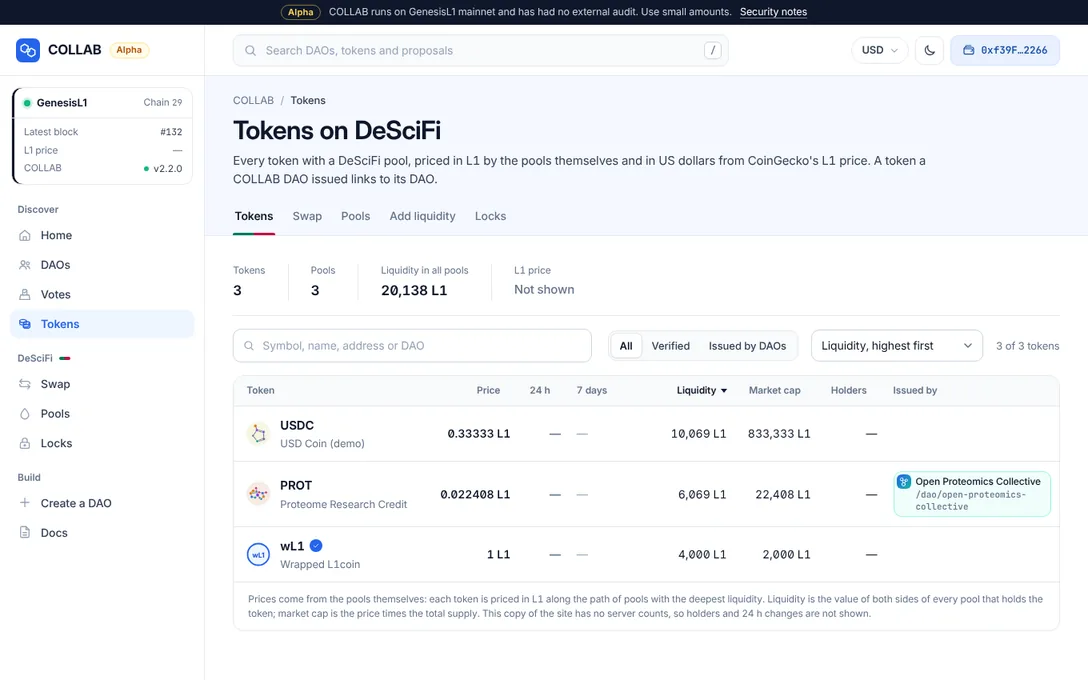
Open Tokens in the sidebar, or the Tokens tab of DeSciFi. The page, "Tokens on DeSciFi", starts with a board of four figures: Tokens, Pools, Liquidity in all pools and the L1 price with its source, or "Not shown" when the site has no current price.
The table has one row per token, the most liquid first:
| Column | What it shows |
|---|---|
| Token | The symbol and name, with a check when this site vouches for the token (see Verification). The row links to the token's page. |
| Price | The price of one token in L1, and below it the value in your display currency. |
| 24 h | The change of the price over the last 24 hours, in percent. |
| 7 days | A small line of the price over the last seven days. |
| Liquidity | The value of both sides of every DeSciFi pool that holds the token. |
| Market cap | The price times the total supply. |
| Holders | How many accounts hold a balance, contracts included. |
| Issued by | The COLLAB DAO that launched the token, by its web address. |
Buy and Sell on each row open the swap ticket with the token already chosen.
Values refresh in place on every new block, and prices that move flash up or down. Rows reorder only when you sort or filter, so nothing jumps under the pointer. The list shows 100 tokens at a time; Show … more adds the next ones.
How the figures are computed
Every price, liquidity and market cap is recomputed in your browser from the pools on chain, at every block. The holders, the 24-hour change and the 7-day line need history that a browser cannot read quickly, so the site's server counts them and publishes them in a data file (see tokens.json). All of it is for display only: nothing COLLAB sends on chain is computed from these figures.
- Price in L1. Each token is priced in L1 along the path of pools with the deepest liquidity that leads to wL1, which is always worth exactly one L1. A token with no path of pools to wL1 has no price in L1.
- Price in your currency. The L1 amount converted at the L1 price. By default that is US dollars from the snapshot the site's server takes of CoinGecko's L1 price at each run; your browser does not contact CoinGecko for it. When the snapshot is missing or more than a day old, amounts show in L1 only. A currency you choose in Settings, US dollars included, is fetched live by your browser; see The display currency.
- 24 h change. The live price against the price 24 hours earlier, which the server recorded.
- 7 days. The server's price series, one point every six hours over seven days; its last point is the live price.
- Liquidity. Both sides of every pool that holds the token, valued at those prices. A pool never values its own token above the other side, so a pool counts for at most twice the value of its other side.
- Market cap. The price times the total supply, labelled as such. Thin pools can make it far from what all the tokens would sell for.
- Holders. The server finds every account that has received the token, from its transfer history, and reads their balances at one block. The count is exact only when those balances add up to the total supply, which proves that no holder is missing. Otherwise it reads "≥ N": at least this many accounts hold a balance, and older transfers are still being read, so the count may grow. Past 50,000 holders the server stops collecting them, and the count stays "≥".
When a figure reads "—"
A dash means the figure is unknown or would mislead:
- no pool links the token to L1, so it has no price in L1;
- its pools are so lopsided that a figure would be absurd: any value above 10^30 L1 is published as unknown, and the token then has no liquidity figure rather than a smaller, wrong one;
- there was no price 24 hours ago to compare with, or not enough history for a line;
- the server has not counted the holders yet.
Unknown values always sort last, whichever way you sort. A copy of the site without a server (a mirror, or a site run from static hosting without the prerender job) has no server counts, and the table says so: holders and 24-hour changes are then not shown.
Searching, filtering and sorting
- Search ("Symbol, name, address or DAO") matches the symbol, the name, the issuing DAO's name or web address, or the start of a token's contract address (from
0xand two hex digits). - Filters: All, Verified (tokens this site vouches for) and Issued by DAOs (tokens a COLLAB DAO launched).
- Sorting: click a column header, or use the order menu: by symbol, price, 24 h change, liquidity (the default, highest first), market cap, holders or issuing DAO, in either direction.
- Hidden tokens. A site's operator can hide a token, for example a spam or impostor token. It is then left out of the list, and the table's note counts how many tokens this site hides. Hiding changes nothing on chain, and the token's page stays reachable by its address.
The issuing DAO
The Issued by column names a DAO only when the COLLAB token launcher's own record shows that a DAO of this COLLAB factory launched the token: no other contract can claim it. The DAO appears by its name and its permanent web address, /dao/<web address>, in full, because a DAO's name is not unique; a warning mark shows when another DAO has the same name.
A DAO issuer is information, not a recommendation. Anyone can create a DAO with any name and logo and launch a token through it, so a token another DAO launched still counts as not verified, unless this site's operator verified it or features the DAO. See Verification and Staying safe.
The token page
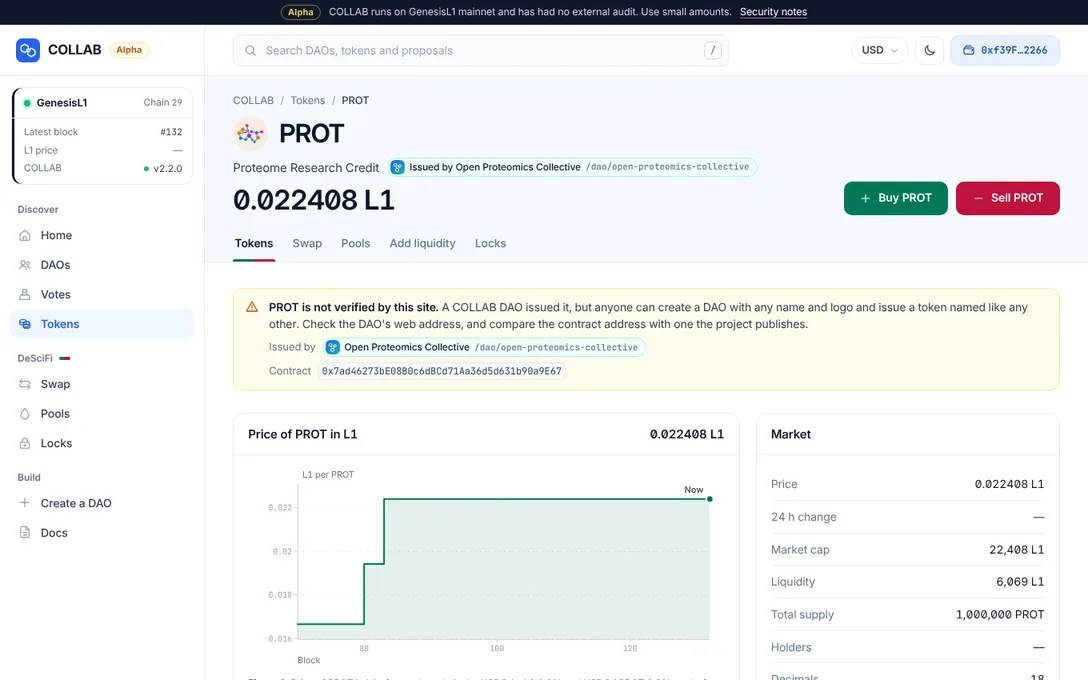
Each token's page is at /tokens/<token address>. Its header shows the symbol and name, whether this site verifies it, the issuing DAO, the price in L1 and your currency with the 24-hour change, and two buttons: Buy … and Sell …, which open the swap ticket. For wL1 they are Wrap L1 and Unwrap wL1.
- Notices. "… is not verified by this site." with the full contract address and, for a DAO's token, the issuing DAO; and, when the site hides the token, a notice that it is left out of the lists here while nothing changed on chain.
- Price. The price of the token in L1 over time, along the pools of its best route. wL1 has no chart: it is always worth exactly one L1.
- Pools with … lists every DeSciFi pool that holds the token, with how much of the token is in it, the price there and the value locked, and links to Trade in that pool or Add liquidity to it. A launch pool is marked as such.
- Market: Price, 24 h change, Market cap, Liquidity, Total supply, Holders, Decimals, Contract and, where the site names an explorer, Open the contract.
- Issued by: the DAO that launched the token, with Open the DAO and Its tokens; or "No COLLAB DAO launched …", meaning DeSciFi knows nothing about who made it.
A token that no pool holds yet has a page too: "No DeSciFi pool holds … yet", with Create a … pool, where the first deposit sets the price. An address that is not an ERC-20 token says so. Search engines see a static version of each token page that the site's server writes, which the app then replaces with live figures.
tokens.json
The figures the browser cannot compute quickly come from /data/tokens.json, a file the site's server writes at each run of its prerender job: for every token its symbol, name, decimals and supply, its pools, the holder count, the 24-hour change and the 7-day series, the issuing DAO, and whether this site verifies or hides it. The pages read it only when they are served from the site's own address, check that it is for the right chain, and check every row before using it. Prices, liquidity and market caps from the file are only a first paint: the browser recomputes them from the chain.
Operators: how the file is made, its format and its limits are in Static pages, data files and prices.