
Site settings
The Site settings tab of the admin page, /admin/site, is where the operator chooses what this site
shows without touching the chain: the alpha strip, an announcement, featured and hidden DAOs,
verified and hidden tokens, the home page's texts for search engines, links, analytics, the RPC
endpoints and the block explorer. This page describes every field: what it changes on the site, its
label on the tab, the rules it must follow, and an example.
How the settings work
The settings live in one file on the server, /var/www/collab/shared/site.json. The tab shows them
in seven cards: Notices, DAOs, Tokens, Search engines, Links, Analytics and
Network. Each card has a preview, On the site, of what the change looks like, and a badge
when it holds changes (Changed) or problems (… to fix).
Every field is checked as you type, with the same rules the server applies, and checked again by the server when you save. A field the server refuses is marked with the server's message.
Saving changes nothing on chain. It changes what this site shows, and only this site: other copies of COLLAB, GL1X and wallets are not affected.
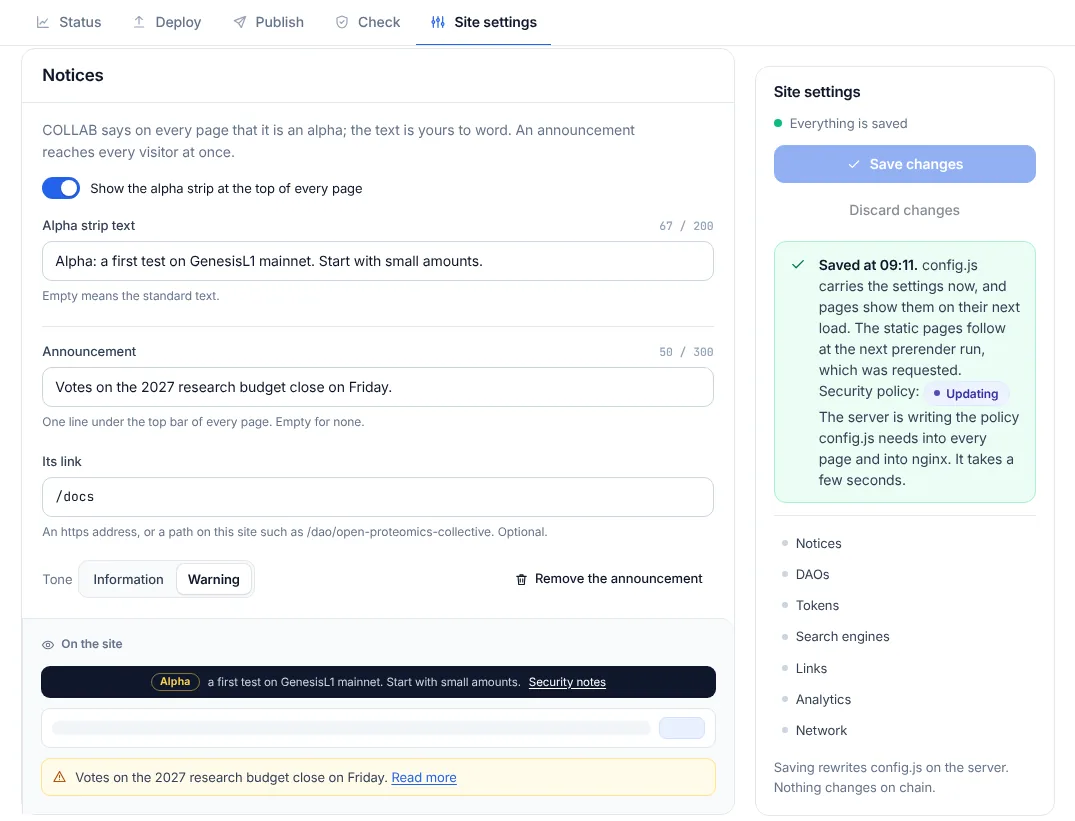
Saving
The save box beside the cards, Site settings, shows the state: "Everything is saved", "Unsaved changes in Notices, DAOs", or "… fields to fix before saving". Save changes sends the whole form; Discard changes goes back to what the server has. Leaving the page with unsaved changes asks first.
After a save, the box says when, and what follows: "config.js carries the settings now, and pages show them on their next load. The static pages follow at the next prerender run, which was requested." So a change reaches visitors in two steps:
- At once:
config.jsis rewritten. Every page reads it on its next load and applies the alpha strip, the announcement, the links, featured and hidden DAOs, verified and hidden tokens, the RPC endpoints and the explorer. - At the next prerender run (requested by the save, usually within seconds): the prerendered copies of the pages, which carry the settings in their HTML for the first paint and for search engines, the home page's search-engine texts, the sitemap, the token list file and the member network.
If someone saved other settings meanwhile, the box says "The settings changed on the server meanwhile." Saving would replace them with this form; Load them instead discards your changes and loads theirs.
The server keeps the version each save replaces in shared/history/ (the newest 50). The file's
format is in Data formats.
When a setting changes the security policy
Every page carries a Content-Security-Policy that lists what it may load and connect to. Two settings change it: an analytics ID, and the RPC endpoints. The admin service cannot write the pages or nginx's configuration itself; after the save it asks root's content policy step to do it:
collab-apply.pathsees the request and startscollab-apply.service(collab apply, as root);- the step checks every value of
config.jsagain, writes the new policy into the release's pages and COLLAB's own nginx file, tests nginx withnginx -tand reloads it; - when nginx refuses, it puts every file back and records why;
- it asks for a prerender run, so the prerendered pages carry the new policy too.
The save box and Status show the policy's badge as the step goes: Updating for a few seconds,
then In step, or Update failed with nginx's reason. sudo collab apply runs the step by hand and prints what
it did ("policy applied: 15 file(s) updated" in the release rehearsal, after a GA4 ID was saved).
See INSTALL.md, section 6.
Notices
The Notices card: "COLLAB says on every page that it is an alpha; the text is yours to word. An announcement reaches every visitor at once."
The alpha strip
| Key | Label | Rules |
|---|---|---|
alpha.show | Show the alpha strip at the top of every page (a switch) | true or false; true by default |
alpha.text | Alpha strip text | plain text on one line, at most 200 characters; empty means the standard text |
The strip is the dark band at the very top of every page: an Alpha tag, the text, and a link to the security notes. Switched off, pages start with the top bar. The Alpha badge beside the COLLAB wordmark stays either way.
The standard text is "Alpha: COLLAB runs on GenesisL1 mainnet and has had no external audit. Use small amounts." The strip shows it without the leading "Alpha:", since its tag already says so; a text of your own that starts with "Alpha:" (or "Alpha." or "Alpha -") is shown the same way.
"alpha": {"show": true, "text": "COLLAB runs on GenesisL1 mainnet and has had no external audit. Use small amounts."}The announcement
| Key | Label | Rules |
|---|---|---|
announcement.text | Announcement | plain text on one line, at most 300 characters; empty for none |
announcement.href | Its link | optional: an https address, or a path on this site that starts with / |
announcement.tone | Tone: Information or Warning | info or warn |
The announcement is one line under the top bar of every page, with an information or a warning
icon, and Read more when it has a link. A path such as /votes opens on the site; an https
link opens in a new tab. Remove the announcement clears all three fields. A link without a text
is refused: "Write the announcement, or clear its link."
From the release rehearsal:
"announcement": {"text": "Open Proteomics Lab launched OPC: see it on the tokens page.", "href": "/tokens", "tone": "warn"}DAOs
The DAOs card: "Hiding changes nothing on chain: it only decides what this site lists. A DAO is either featured or hidden."
Type a DAO's web address (its slug), or paste the address of its page (https://…/dao/<slug>), and
press the card's button. Each entry is looked up on chain and shows the DAO's title and slug, or
why it could not: "No DAO with this name on this deployment yet. It applies if one is created." or,
before a deployment is published, "Looked up once COLLAB is deployed here."
Featured DAOs
| Key | Label | Rules |
|---|---|---|
featuredDaos | Featured DAOs, button Feature | up to 24 slugs, in the order shown; no DAO twice; none of them hidden |
The home page shows up to six featured DAOs, in this order, under "Featured DAOs", in place of the six largest by members that it shows under "DAOs on COLLAB" otherwise. Use the arrows to change the order. Tokens launched by a featured DAO count as verified on the tokens pages ("Issued by a DAO this site features").
A slug has 3 to 48 lowercase letters, digits and hyphens, starts with a letter, has no double hyphen and does not end with one. Featured DAOs are named by slug only.
"featuredDaos": ["open-proteomics-collective", "longevity-data-commons"]Hidden DAOs
| Key | Label | Rules |
|---|---|---|
hiddenDaos | Hidden DAOs, button Hide | up to 1,000 slugs or treasury addresses; none of them featured |
A hidden DAO is left out of the DAOs directory, the search, the home page, the sitemap and the member network. The directory says how many: "This site leaves 1 DAO out of its lists." Its pages stay open to anyone with the link, with a notice, "Hidden on this site. Its operator leaves this DAO out of the directory, search and the sitemap. Its pages stay open to anyone with the link, and nothing about it changed on chain.", and they ask search engines not to index them.
A treasury address is 0x and 40 hexadecimal digits, not zero, with a right checksum when written
in mixed case. It is stored in lowercase. The DAO hidden in the release rehearsal, by its slug and
by its treasury address (one of the two is enough):
"hiddenDaos": ["quiet-assay-circle", "0x187b085f8854c58943682cddd5a5acd68c438a48"]Tokens
The Tokens card: "Verified tokens carry a badge on the tokens page and in swaps, so buyers can tell them from look-alikes. Hidden ones are left out of listings."
Type a token's address, or paste the address of its page (https://…/tokens/0x…). Each entry is
looked up on chain and shows the token's symbol and name, or "No token contract at this address on
this chain."
Verified tokens
| Key | Label | Rules |
|---|---|---|
verifiedTokens | Verified tokens, button Verify | up to 1,000 token addresses; none of them hidden |
A verified token gets a check mark beside its symbol on the tokens list ("Verified by this site's operator"), Verified by this site on its page and in the swap ticket, and Verified in the swap's token picker; the warning that it is not verified goes away. wL1 is always verified, as part of the deployment, and so are tokens launched by a featured DAO. Verify only tokens whose contract address you have checked with their issuer: anyone can create a token with any name or symbol.
The token from the release rehearsal:
"verifiedTokens": ["0x01120971d58403594875afffe0efc4e4f4607195"]Hidden tokens
| Key | Label | Rules |
|---|---|---|
hiddenTokens | Hidden tokens, button Hide | up to 1,000 token addresses; none of them verified |
A hidden token is left out of the tokens list, the swap picker's list, the pools list, the search and the sitemap. Its exact address still finds it, and its page stays, with a notice ("This site hides … from its lists. … Nothing changed on chain: the token and its pools work as before.") and asks search engines not to index it.
Addresses follow the rule of treasury addresses above, and are stored in lowercase. Each entry is a
full 0x address of 40 hexadecimal digits:
"hiddenTokens": ["0x…"]Search engines
| Key | Label | Rules |
|---|---|---|
seo.title | Title | plain text on one line, at most 70 characters; empty means the standard title |
seo.description | Description | plain text on one line, at most 200 characters; empty means the standard one |
"The home page's title and description, which search results and link previews show." The hints say what reads best: about 50 to 60 characters for the title, and 120 to 160 for the description. The standard title is "COLLAB | Scientific DAOs on GenesisL1".
These two go into the home page's <title>, its description and its Open Graph and Twitter copies.
The prerender job writes them into the page, so they appear after its next run, not on the next
page load.
"seo": {"title": "COLLAB | Scientific DAOs on GenesisL1", "description": "Create and run scientific DAOs on GenesisL1: share-based voting with deposits, quorum and veto, a treasury for tokens, data and models, and built-in liquidity."}Links
| Key | Label | Rules |
|---|---|---|
links.website | Website | empty, or an https address |
links.x | X | empty, or an https address |
links.telegram | Telegram | empty, or an https address |
links.discord | Discord | empty, or an https address |
links.github | GitHub | empty, or an https address |
"This site's own accounts. The footer lists them beside the GenesisL1 ecosystem." Each opens in a new tab. With none, the footer shows the GenesisL1 ecosystem only.
"links": {"website": "https://genesisl1.com", "x": "", "telegram": "", "discord": "", "github": ""}Analytics
| Key | Label | Rules |
|---|---|---|
analytics.ga4 | Google Analytics 4 measurement ID | empty for none, or G- (or GT-) followed by at least four letters or digits; at most 40 characters |
Without an ID, nothing is ever sent to Google, and the cookie notice only says "COLLAB keeps your settings in this browser. No tracking or ad cookies."
With an ID, the cookie notice asks "May COLLAB count visits with Google Analytics? Nothing loads unless you accept, and no ads." with Accept and Decline, the same size.
- Nothing is requested from Google before Accept.
- The question comes back after 12 months for an Accept and 6 months for a Decline.
- A browser that sends Global Privacy Control is not asked. It gets a note instead ("Your browser sends Global Privacy Control, so COLLAB does not count your visits."), and its visitor can still opt in through Cookie settings in the footer.
- Advertising features and Google signals stay off.
The ID changes the security policy, which then allows Google's analytics addresses on every page; see above. Removing the ID removes them again.
"analytics": {"ga4": "G-XXXXXXXXXX"}Network
"Where visitors read GenesisL1 from, and where explorer links lead. Test an endpoint before you save it: it must serve chain 29 with a recent block."
RPC endpoints
| Key | Label | Rules |
|---|---|---|
rpcs | RPC endpoints: rows of Name (optional) and an address; Add an endpoint | up to 8 rows; each address https (http only for 127.0.0.1 or localhost), at most 300 characters, listed once; each name at most 60 characters |
Visitors' browsers read the chain through these endpoints, in this order, moving to the next when one
fails. They are the presets of the site's own Settings page under Network, with Automatic
using every endpoint in order; visitors may also enter an https endpoint of their own there. With
none listed, the standard ones serve: the GenesisL1 RPC (https://rpc.genesisl1.org) and the GL1X
JSON-RPC (https://gl1x.com/api/eth-rpc). The prerender job reads the same list, unless the
installer's --rpc names its own endpoint.
A trailing / is dropped, and an empty name becomes the endpoint's host. A row without an address
is refused ("Enter the endpoint's address, or remove this row."), and so is an address listed twice
("Endpoint 1 has this address already.").
Test (or Test them all) asks the endpoint, from your browser, for its chain and its newest block, and answers "Chain 29, block …, … ms", or why not:
- "This endpoint serves chain …, not GenesisL1 (29).";
- "Its newest block (…) is … minutes old, so the endpoint is not in sync." (more than 15 minutes);
- "No answer within 8 seconds.", or "The endpoint answered HTTP …";
- "The browser could not reach it. It may be offline, block other sites (CORS) or be outside this site's security policy." Visitors' browsers call the endpoint from your site's pages, so it must allow requests from other sites.
The server does not test endpoints when you save: test them first. The list changes the security
policy's connect-src, which then names these endpoints; see
above. The preview shows the resulting connect-src.
"rpcs": [{"name": "GenesisL1 RPC", "url": "https://rpc.genesisl1.org"}, {"name": "GL1X JSON-RPC", "url": "https://gl1x.com/api/eth-rpc"}]Block explorer
| Key | Label | Rules |
|---|---|---|
explorer | Block explorer: GL1X, the standard or Another explorer, with Name and Address | null for GL1X; otherwise a name of at most 60 characters and an https address |
Links such as "View on explorer" open the explorer: <address>/tx/<hash> for a transaction and
<address>/address/<address> for an account, so another explorer must use those paths. Visitors may
still pick another explorer in their own settings.
"explorer": {"name": "GL1X", "url": "https://gl1x.com"}What hidden means
Hiding a DAO or a token decides only what this site lists:
- nothing changes on chain: the DAO, its treasury, its votes, the token and its pools work as before;
- other copies of COLLAB, GL1X and wallets still show them;
- their pages on this site stay reachable by their address, with a notice, and ask search engines not to index them;
- members of a hidden DAO can still use it on this site through its address.
Hiding is a way to keep spam, look-alikes or abandoned test DAOs off the site's lists, not a way to stop or censor anyone.
Rules for the whole file
- No unknown keys. A key the server does not know is refused: "… is not a setting (known: …)".
- At most 65,536 bytes, counted on the normalized settings as JSON: "The settings take more than 65536 bytes: shorten the lists."
- Plain text. Texts are trimmed, and a line break, a control character, or an invisible or bidirectional mark is refused: "Remove the line break or the invisible character." Lengths count characters, not bytes.
- Links. At most 300 characters, of letters, digits and the usual URL punctuation; never spaces,
quotes, angle brackets or backslashes. The host is letters, digits, dots and hyphens (punycode,
xn--…, for other names), with an optional port, and no user name or password. - Addresses are stored in lowercase; DAO slugs and token addresses are each listed once.