
Publish, unpublish and check
Publishing tells a COLLAB site which contracts its pages read. Until a deployment is published, every page says that COLLAB is not deployed on this site yet. This page is for the operator: what publishing writes on the server, how to publish a deployment you have made or one that already exists, how to take it off the site again, and how anyone can check which contracts a site uses.
What publishing does
Publishing sends the deployment record, the content of deployments/29.json, to the admin
service. The server then:
- checks the record again, strictly (see What the server refuses);
- keeps it as
/var/www/collab/shared/deployments/29.json, and the record it replaces inshared/history/; - writes
config.jsagain from the record and the site settings, keeping the old one in the history too; - asks for a prerender run, and for the content policy step when the policy
config.jsneeds differs from the one the pages carry.
config.js is revalidated on every load, so every page reads the new contracts on its next load.
The site leaves its undeployed mode at once: the window "COLLAB is not deployed on this site yet"
gives way to the DAOs, votes and tokens of the new deployment. Pages already open pick it up when
they are loaded again.
Publishing changes nothing on chain. It only chooses what this site shows.
Publishing from the Deploy tab
Right after a deployment, the Deploy tab's last step, Publish to this site, publishes it: sign in, press the button and confirm. See Deploy the protocol from /admin.
The Publish tab
The Publish tab, /admin/publish, needs the admin token. It has two cards.
On this site now
The deployment the site publishes: badge Published or Nothing published, its version and chain, the DAO factory, the start block and the integrations, with Check it and Unpublish.
Publishing an existing deployment
Publish a deployment publishes a deployment of this release that already exists, for example one made with Foundry, or one deployed from another browser. Choose where it comes from: A deployments file or Read it from the chain. Either way, the page checks the record on chain before Publish to this site unlocks.
From a deployments file
Choose the file in Deployments JSON file (deployments/<chainId>.json, as script/Deploy.s.sol
or the Deploy tab writes it, at most 256 KB), or paste its contents into Or paste its contents.
The page first says what the server would refuse ("The server would refuse this record."). A record the server would accept is checked at once: "Checking 12 of 60…", then Verified or Failed with the results. It reads the chain through your wallet when the wallet is on the record's chain, and otherwise through this site's RPC endpoint, which it says ("Read through this site's RPC endpoint."). Run the checks runs them again.
Read from the chain
Without the file, the page can rebuild the record from the chain:
- DAO factory address: the address every DAO of the deployment was created by.
- The account that deployed it: the account that created the factory and, right after it, the two lenses. Your wallet's account is filled in when it is connected.
Find the deployment then reads:
- 18 of the 20 contracts and wL1, through the factory's getters and the contracts they point at;
- the two lenses, as the deployer's next two creations after the factory;
- the start block, as the block before the text store's creation (on a node that keeps old state);
- the integration lists from the factory, named after this site's configuration or Deploy.s.sol's chain 29 list when the addresses match.
What the chain cannot tell, the page asks for: DAO lens and Market lens when the account that deployed it is not given or did not create the factory; Start block in those cases too, or when the node keeps no old state ("GL1X shows the text store's creation"); and the Name, Id, Site and Model store of an integration it cannot name.
Confirming
Publish to this site asks first: "Publish to collab.genesisl1.com?" (your host). When the site shows another deployment, the dialog says that this replaces it and that the replaced record stays in the server's history.
What the server refuses
The server checks every record again, whatever the page said, and answers with the reason and the field: "The server refused the record." It refuses a record:
- for another chain: "this site serves chain 29; the record is for chain …";
- without a COLLAB version, or of another minor version than the release: "the record is for COLLAB DAO v2.1.0, but this site runs COLLAB 2.2.0, which needs COLLAB DAO v2.2.x contracts";
- without a start block: "startBlock must be a block number";
- missing an address: "missing or invalid address for daoLens: None", for any of
factory,daoLens,marketLens,textStore,keyring,desciFactory,desciRouter,lockFactory,distributor,launcher,wl1andpolicyBuilder; - with a zero address, an address used twice, or a mixed-case address with a wrong checksum: "the address for factory has a wrong checksum: …";
- with integration entries the site could not show, as in the Deploy tab's step 2: an id, a name or a site that is not allowed, a zero or repeated address, or more than 8 of a kind;
- with any other key whose value is not an address (apart from an optional
rpcURL), or with more than 64 keys.
The full format is in Data formats, and the request in the Admin API reference.
After publishing
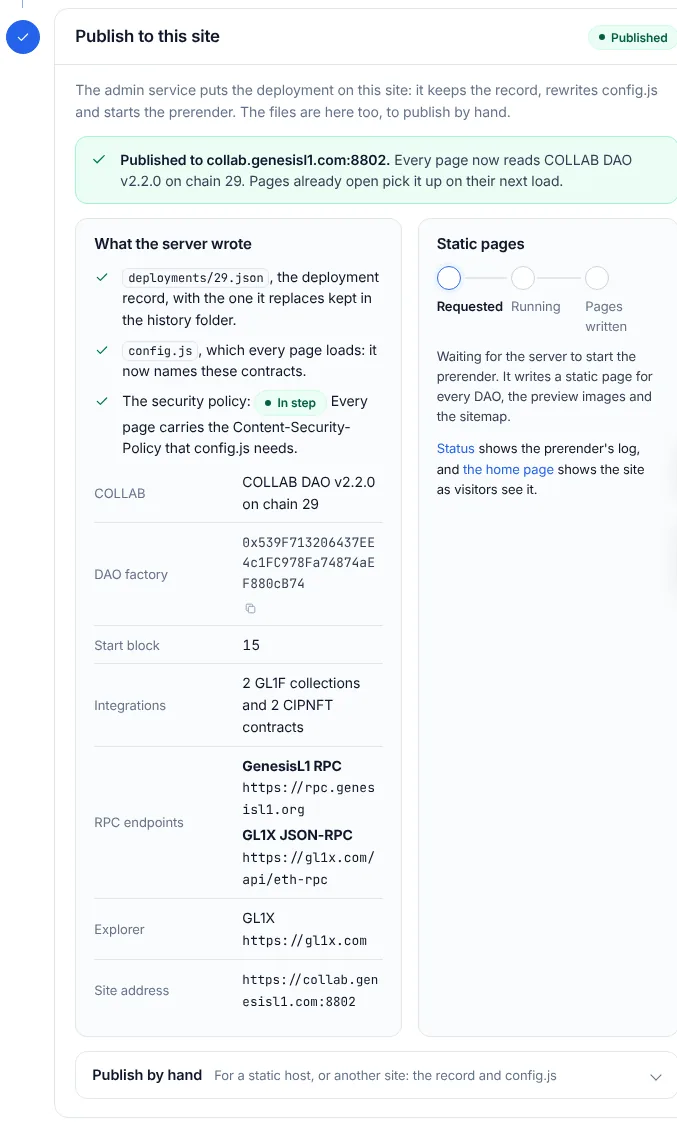
The page shows what the server wrote:
deployments/29.json, with the one it replaces kept in the history folder;config.js, which every page loads, now naming these contracts;- the security policy, with its badge: In step, or Updating for a few seconds.
Beside it, Static pages follows the prerender run live: Requested, Running, then Pages written, Written, with warnings or Failed. The first run after publishing writes the pages, the sitemap and the member network; DAO pages appear for each DAO as members create them.
Then open the home page as a visitor would, and Status for the prerender's log.
Unpublishing
Unpublish, on the Publish tab, takes the deployment off the site. The dialog, "Take this deployment off the site?", says what follows:
- every page goes back to saying that COLLAB is not deployed here, with a link to the admin page;
- the contracts stay on chain and keep working everywhere else;
- the record is kept in the server's history, and you can publish it again at any time.
The page sends the admin API's {"record": null}. The server writes an undeployed config.js,
moves the record to the history and asks for a prerender run, which removes that deployment's
pages, preview images and data files; Static pages, data files and prices
says what stays.
Replacing a deployment
Publishing another record replaces the one on the site; there is one deployment per chain. The replaced record goes to the history, and the next prerender run removes the pages and preview images of DAOs the new factory does not list. DAOs of the old factory keep working on chain, but this site no longer shows them.
The history folder
/var/www/collab/shared/history/ keeps the newest 50 replaced versions of each file: the deployment
record (…-deployment-29.json), config.js and site.json, each named after the time it was
replaced. Only collab and root can read it:
sudo ls -l /var/www/collab/shared/history/To publish an earlier record again, copy it from there to your computer and publish it from the Publish tab's file field.
Checking any deployment
The Check tab, /admin/check, reads a deployment back from the chain and compares it with this
release. It needs no admin token and sends nothing, so anyone can use it to confirm that a COLLAB
site points at genuine contracts. The tab runs the code the site serves, so its answer is only as
trustworthy as that code: to check a site you do not trust, first compare the files it serves with
the release's SHA256SUMS. 2.1's /deploy?mode=check arrives here.
Under What to check, choose:
- This site's configuration: the contracts
config.jsnames (once a deployment is published); - A deployments file: any
deployments/<chainId>.json, chosen or pasted.
Run the checks then checks:
- Code: each of the 20 contracts holds the code of this release, byte for byte except its immutables;
- Wiring: every constructor argument reads back as Deploy.s.sol passes it;
- External contracts: wL1 exists and answers as it should; on GenesisL1 it must be the one Deploy.s.sol names;
- Integrations: each listed GL1F collection is one collection whose contracts point at each other, each CIPNFT contract answers like CIPNFT, and the DAO factory lists exactly these;
- Found on chain: contracts a record does not name, like the six DAO implementations, are found through the factory and checked too.
The checks read the chain through your wallet when it is connected to the record's chain, and otherwise through the RPC endpoint in your settings, which the result says: "Read through the RPC endpoint in your settings." A result is only as trustworthy as that endpoint; connect a wallet and run the checks again to read through your wallet's own network.