
Hosting without the server kit
COLLAB's site is a folder of static files, so it can be hosted without server/install.sh: on a web
server you configure yourself, on Netlify or Cloudflare Pages, or on IPFS. This page is for the
operator who chooses that path: what you give up, how to write config.js, the ready-made
configurations in deploy/, and the one rule that keeps browsers' caches right.
Deploying COLLAB: reference has every detail of the website part.
What you lose
| With the server kit | Without it |
|---|---|
Publish from the admin page writes config.js | you write config.js with tools/write_web_config.py, or download it from the Deploy tab, and upload it |
| The Site settings form | the same settings in a site.json file, passed to write_web_config.py --site |
| Status: prerender, certificate, policy, disk | nothing on the admin page; watch your host yourself |
| The prerender job every 10 minutes | tools/prerender.py from cron on a server you control, or by hand before each upload |
The L1 price snapshot, /data/price.json | only when you run the prerender with --data; a file older than a day shows amounts in L1 only |
A cache rule per release for ?v= addresses | replace web/ as a whole at every upgrade (below) |
| The content policy step | --patch-csp and deploy/sync_csp.py by hand |
What stays the same: every page, every read from the chain, every transaction. The admin page's Deploy and Check tabs run in the browser alone, so you can deploy and check from any copy of the site.
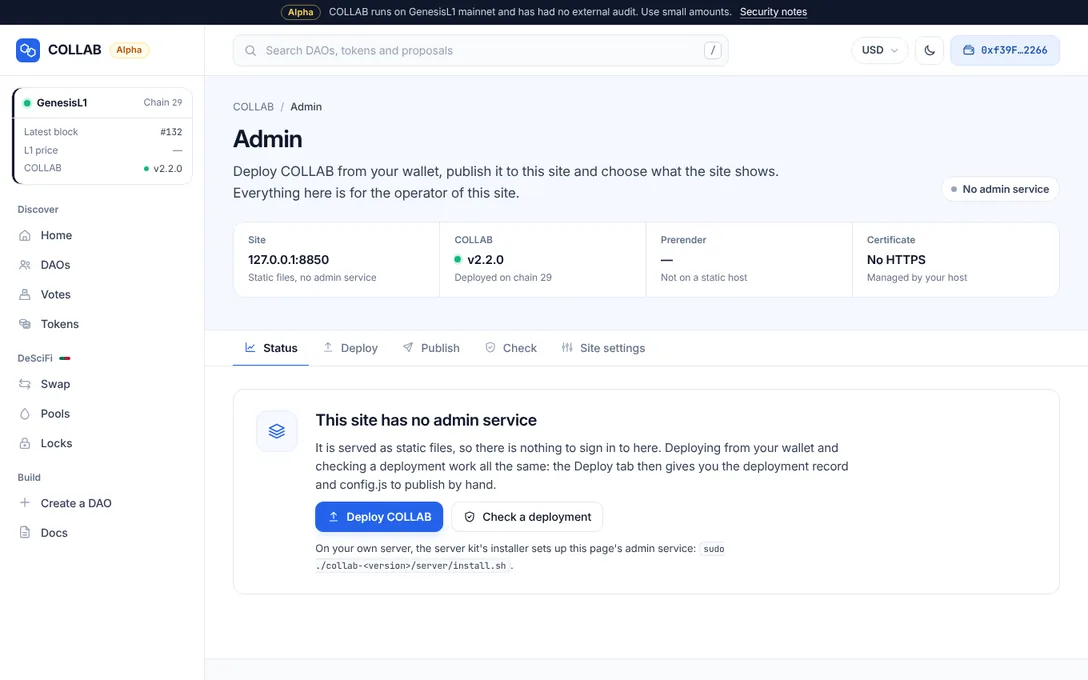
On a host without the admin service, the Deploy tab's last step opens Publish by hand by itself,
with the deployment record and a config.js to download. See
Deploy the protocol from /admin.
Generating config.js
config.js is the only file that differs between deployments. From the release folder, with the
deployment record saved as deployments/29.json:
python3 tools/write_web_config.py deployments/29.json --patch-csp --site-url https://collab.example.org
python3 deploy/sync_csp.pywrite_web_config.pywritesweb/config.jsand, with--patch-csp, the Content-Security-Policy this configuration needs into every page.deploy/sync_csp.pycopies that policy intodeploy/nginx/collab.conf,deploy/caddy/Caddyfileandweb/_headers;--checkonly checks that they agree.--site-urlis the address you actually serve the site from: canonical links use it, and the home page reads/og/network.jsononly when served from it. On another domain, theSitemap:line ofweb/robots.txtmust name it too. Every prerender run writes that line; on a host without the job,python3 tools/prerender.py --static-sitemap --site https://collab.example.orgwritesweb/sitemap.xmlandweb/robots.txtfor that address before you upload.--site site.jsontakes the site settings from a file, with the fields of Site settings;--rpc,--explorer,--no-custom-rpc,--price-apiand--ga-idset the rest. A value given on the command line wins oversite.json.
Every URL must be https (http only for localhost and 127.0.0.1). --strict checks the record as
the server kit's admin API does. The Deploy tab's Publish by hand writes the same config.js,
and shows the command and the policy for it.
Serve the site at the root of a domain: its pages name their files from the root (/assets/…,
/js/…, /config.js), so a sub-path such as https://example.org/collab/ does not work. Leave out
web/DEVELOPING.md and web/config.local.js, which are for development only.
Plain nginx or Caddy
nginx
deploy/nginx/collab.conf does what the server kit's nginx file does for the site itself: HTTPS,
clean URLs, the prerendered pages, the security headers, compression and caching. It is written for
nginx 1.18 and later.
sudo cp deploy/nginx/collab.conf /etc/nginx/sites-available/collab.conf
sudo ln -s /etc/nginx/sites-available/collab.conf /etc/nginx/sites-enabled/collab.conf
sudo nginx -t && sudo systemctl reload nginx
First edit server_name, root (by default /srv/collab/web), the certificate paths and the
redirect target of the port 80 server. It expects a Let's Encrypt certificate from
certbot certonly --webroot or --nginx, and nginx -t fails while the certificate files are
missing. For --webroot, uncomment the port 80 server's acme-challenge location and point it at
certbot's webroot.
Caddy
deploy/caddy/Caddyfile does the same on Caddy 2.6 and later, and Caddy gets and renews the
certificate itself:
sudo cp deploy/caddy/Caddyfile /etc/caddy/Caddyfile
caddy validate --config /etc/caddy/Caddyfile && sudo systemctl reload caddy
Edit the site address and root first.
The prerender job from cron
Run the job every 10 minutes as a user that may write in the web root, where it writes its pages and
images, sitemap.xml and robots.txt; the web server only reads them. Keep its lock, and the caches
beside it, in a folder that user owns outside the web root:
sudo install -d -m 700 -o <user> /var/lib/collab*/10 * * * * cd /srv/collab && python3 tools/prerender.py --web /srv/collab/web --lock /var/lib/collab/prerender.lock --quietAdd --data /srv/collab/web/data to write the /data/
cache too (the price, the token list, logos and descriptions), which both configurations serve with
the server kit's rules. The job needs Python 3.9 or later, Pillow and keccak-256; see
Deploying COLLAB: reference.
Written into the web root itself, the job's pages carry the site settings only through config.js,
in the browser. The home page's search-engine title and description are written into the page only
when the job writes to another folder than --web, as the server kit does.
Netlify and Cloudflare Pages
Publish web/, with config.js and the prerender job's output in it. These hosts read two files of
the release:
web/_redirects: the clean URLs. A rule applies only where no file matches, so the old.htmladdresses answer as they are, and the app moves them to the clean address.web/_headers: the security headers and cache lifetimes of the nginx and Caddy files, its policy kept in step bydeploy/sync_csp.py.
Their limits:
- each header is set by one matching rule only, since these hosts join the values of several;
- paths without a cache rule, such as the app's own modules, get the host's default, which revalidates on every load;
- error responses carry the security headers but no Cross-Origin-Resource-Policy;
- there is no cron: run the prerender job before each upload.
Check such a site with python3 deploy/check_site.py https://collab.example.org --static-host.
IPFS
web/_redirects also serves IPFS subdomain gateways (https://<cid>.ipfs.<gateway>/) and DNSLink
sites. Path gateways (https://<gateway>/ipfs/<cid>/) cannot serve the site, because its paths start
from the root.
- Gateways send their own headers: each page's
<meta>policy still applies, but blocking framing needs a header, which a gateway may not send. - A site on IPFS is a snapshot: its prerendered DAO pages do not change, newer DAOs use the generic
DAO page, and a
price.jsonin it is used for a day only. - Its
--site-urlshould be the DNSLink name you publish it under.
Replace web/ as a whole
The release's pages name their scripts, styles and images with ?v= and one version for the whole
release (12 hex digits of a hash of every file in web/), and the static nginx and Caddy files keep
any ?v= address for a year. That is right while the
pages and the files they name come from one release. So at every upgrade:
- replace the published
web/as a whole, rather than copy the new release over the old one; - then run the prerender job, so its pages come from the new release too.
Otherwise a prerendered page left from the old release asks for its old ?v= addresses and gets the
new release's files, which browsers and CDNs would then keep for a year. The server kit avoids this
by itself: its nginx keeps only the current release's ?v=, and the installer removes the old
release's prerendered pages.