
Deploy the protocol from /admin
The Deploy tab of the admin page, /admin/deploy, deploys the whole COLLAB protocol from your
browser wallet: 20 contract creations, the same ones in the same order as script/Deploy.s.sol,
one transaction each. It then reads every contract back, compares it with this release and, once
you are signed in, publishes the deployment on this site. This page walks through its six steps,
for the operator who deploys.
Before you start
What deploying means
- Permanent. Contracts cannot be changed or removed once deployed, and the fees are not refunded.
- No owner. The DAO factory and every DAO it creates have no owner, the deploying account included. There is nothing to configure or hand over afterwards.
- No key on the page. The page never asks for or handles a key. Your wallet signs each transaction after you confirm it.
- An alpha. COLLAB 2.2 has had AI-assisted reviews and no external audit.
The Deploy tab works without signing in. Only its last step, publishing on this site, needs the admin token.
The wallet
Any EIP-1193 browser wallet works: MetaMask, Rabby, or Keplr in EVM mode. Use an account on GenesisL1, chain 29, holding enough L1 for the fees. The page can switch the wallet to GenesisL1, and add the network to it when the wallet does not know it yet.
How much L1 you need
The plan step estimates every creation with your wallet's node and prices it at the current gas price before you start. For a first idea, from the release rehearsal and the admin page's tests with this release:
| Figure | Gas |
|---|---|
| All 20 creations, gas used (release rehearsal) | 42,953,788 |
| The largest creation, the governor implementation | 4,631,659 |
| The largest gas limit sent (its estimate × 1.2 + 20,000) | 5,577,990 |
Every creation is far below the 25 million gas at which GenesisL1 nodes cap an estimate by default. At a 50 gwei gas price, 42,953,788 gas costs about 2.15 L1. Each transaction is sent with a gas limit of its estimate × 1.2 + 20,000, and the plan warns when your balance is below the sum of those limits at the current price. Keep a margin above it: a deployment that runs out of L1 stops, and resumes once you add more.
The six steps
| Step | What it does |
|---|---|
| 1. Network and wallet | connects your wallet and confirms the network |
| 2. External contracts and integrations | wL1, and the GL1F collections and CIPNFT contracts the DAO factory will list; each is checked on chain |
| 3. Plan and cost | the 20 transactions, their gas, and the cost at the current price |
| 4. Deploy | sends the 20 creations, one after another |
| 5. Verify | reads every contract back and compares it with this release |
| 6. Publish to this site | the admin service puts the deployment on this site |
A Progress card beside the steps counts the contracts (Pending, Sent, Confirmed, Verified, Failed), and the This release card shows the release, the compiler, its settings and the SHA-256 of the protocol bundle the page deploys from.
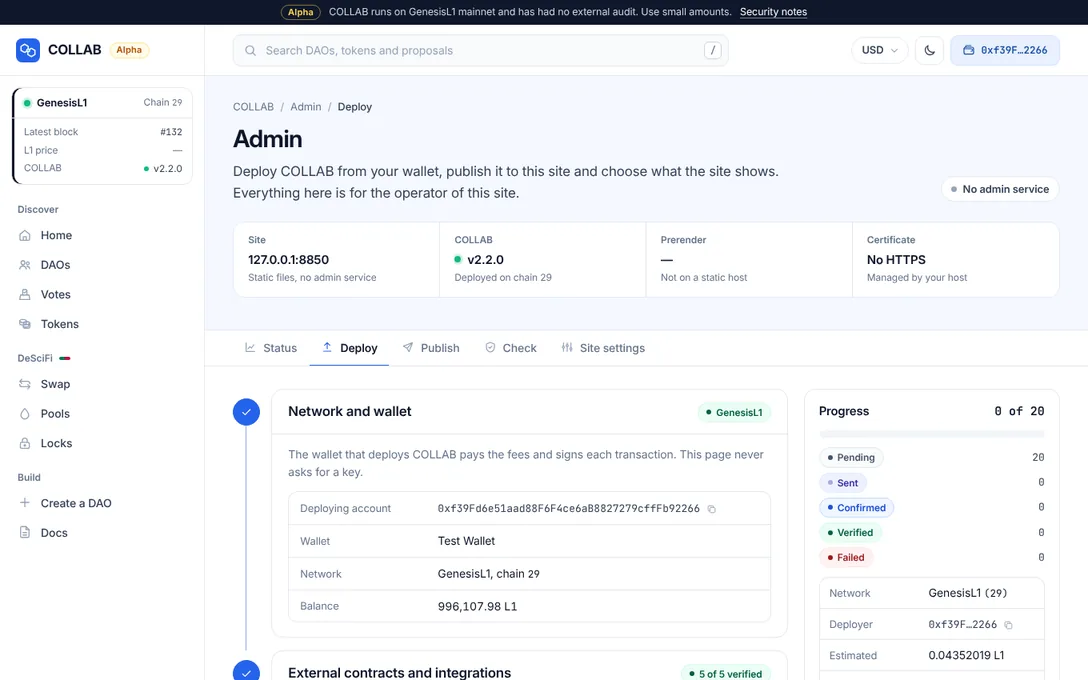
Step 1: network and wallet
Press Connect wallet. The step then shows the Deploying account, the Wallet, the Network and the Balance.
On GenesisL1 the step is done. On another chain the page warns ("This is chain …, not GenesisL1."), and you either press Switch the wallet to GenesisL1 or, to test on purpose, turn on Deploy to chain … on purpose. Contracts and files made on another chain belong to that chain.
Step 2: external contracts and integrations
These go into the constructors and cannot be changed later. On chain 29 they are prefilled from
script/integrations.json, the live GenesisL1 contracts (on a site that already publishes a
deployment, from its config.js instead):
| Field | Prefilled with |
|---|---|
| wL1 (wrapped L1, the ERC-20 form of L1 that pools trade) | 0x59a153c0fD47C6c1F305Abdb8030A90Aa3001fe2 |
GL1F collection 1, GL1F (id forest) | registry 0x33c9844F77a07e36B98f0FFf8201B8A8b02c2a69, site https://gl1f.com/ |
GL1F collection 2, GL1F Crypto (id crypto) | registry 0xF93C5407B07C29cCA9E1313d587fBDF33405038B, site https://crypto.gl1f.com/ |
CIPNFT contract 1, CIPNFT (id cipnft) | 0x05e4F1929947bE93a853F2de155fc1d6137f8446, site https://cipnft.com |
Each GL1F collection has five addresses (Registry, Model NFT, Market, Runtime and Model store); Deploying COLLAB: reference lists them all.
Under Integrations DAOs start with, the DAO factory's lists are what the creation wizard preselects for a new DAO. Each DAO can add or remove its own later by a critical vote, so these lists bind no DAO. You may edit, add (Add a GL1F collection, Add a CIPNFT contract) or Remove entries, at most 8 of each.
Each entry needs:
- a Name of at most 40 plain characters, in Latin letters or in Chinese, Japanese or Korean ones, unlike any other entry's name, ignoring case and look-alike characters;
- an Id of at most 32 lowercase letters, digits and hyphens, starting and ending with a letter
or digit, not starting with
x-(kept for DAOs' own integrations), and unique; - a Site with an https address, or none;
- addresses that are non-zero, distinct from each other and from wL1, with a right checksum.
Every address is then checked on chain:
- wL1 must answer
symbol()with wL1 anddecimals()with 18; - a GL1F collection's registry, Model NFT, market and runtime must point at each other, and its model store must have code;
- a CIPNFT contract must answer as CIPNFT does.
Check the contracts runs the checks again; Use Deploy.s.sol's chain 29 addresses puts the defaults back. Once the deployment has started, the step is locked: "These contracts and lists are part of the deployment under way and can no longer change. Start over to use others."
Step 3: plan and cost
The plan appears once the network is confirmed and every contract of step 2 is verified. It shows the Transactions, the total Gas, the Gas price ("now, from your wallet's node"), the Estimated cost (with the most the gas limits could cost: "at most … with the 20% gas margin") and your Wallet balance.
Two creations, the DeSciFi router and the token launcher, call the DeSciFi factory in their constructors before it exists, so their gas is first estimated from their code size and marked "about"; each is estimated exactly right before it is sent. When your balance may not cover every gas limit, the plan says so: "Your balance may not cover every transaction." Estimate again refreshes the plan.
The 20 contracts
| # | On the page | Contract | What it is |
|---|---|---|---|
| 1 | Text store | TextStore | Stores constitutions, announcements and proposal texts as content-addressed blobs. |
| 2 | Member keyring | CollabKeyring | Holds members' public encryption keys for sealed data, shared by every DAO. |
| 3 | Pool implementation | DeSciFiPair | The code every DeSciFi pool runs as a clone. |
| 4 | DeSciFi factory | DeSciFiFactory | Creates and lists DeSciFi pools. |
| 5 | DeSciFi router | DeSciFiRouter | Swaps and liquidity with slippage and deadline limits. |
| 6 | Lock box implementation | LockBox | The code every liquidity lock runs as a clone. |
| 7 | Lock factory | LockFactory | Creates locks for DeSciFi LP tokens. |
| 8 | Member distributor | MemberDistributor | Runs snapshot airdrops to DAO members. |
| 9 | DAO token implementation | DAOToken | The code every DAO-launched token runs as a clone. |
| 10 | Token launcher | TokenLauncher | Issues DAO tokens with their allocations and first pools. |
| 11 | Policy builder | PolicyBuilder | Writes the default call policy of each new DAO. |
| 12 | Share token implementation | ShareToken | Voting shares with delegation and snapshots. |
| 13 | Governor implementation | DAOGovernor | Deposits, votes, timelocks and execution. |
| 14 | Treasury implementation | DAOTreasury | Holds a DAO's assets and acts on passed proposals. |
| 15 | Policy implementation | DAOPolicy | What each kind of proposal may call. |
| 16 | Profile implementation | DAOProfile | Title, logo, description, links and representatives. |
| 17 | Key vault implementation | CipherVault | A DAO's seat in CIPNFT for sealed data. |
| 18 | DAO factory | DAOFactory | Creates every DAO from the six implementations. It has no owner. |
| 19 | DAO lens | DAOLens | Read-only views the site uses for DAO pages. |
| 20 | Market lens | MarketLens | Read-only views for tokens, pools, locks and airdrops. |
The Contracts guide explains how they work together.
Step 4: deploy
The step reminds you: "Deploying sends 20 transactions from your wallet. Contracts are permanent once deployed." Press Deploy 20 contracts and confirm in the dialog.
Confirming each transaction
For each contract, in order, the page:
- builds the creation with the addresses of the contracts before it;
- estimates it with your wallet's node ("Checking the transaction before your wallet opens…"). A creation whose estimate fails is not sent: "The creation would fail, so it was not sent.";
- opens your wallet ("Confirm in your wallet…"). Check the network and confirm;
- waits for a block ("Submitted 0x…, waiting for a block…");
- compares the new contract's code with this release before it moves on ("Created 0x… in block …").
The ledger of step 3 follows along: Pending, In your wallet, Sent, Confirmed, then Verified after step 5. While it runs, Pause after this transaction stops after the current one, and Deploy the remaining … carries on.
When a transaction fails or you reject it, the deployment stops with the reason, and the button becomes Retry: deploy the … for that contract. The contracts already deployed stay on chain and in the plan.
What a failure costs
GenesisL1 charges every transaction at least half its gas limit, even when it fails. A creation here is sent only after its own estimate succeeds, with a limit of that estimate × 1.2 + 20,000, so a failure is rare. It still costs at least half that limit and at most all of it: for the largest creation, from about 2.8 million gas (0.14 L1 at 50 gwei) to 5,577,990 gas (about 0.28 L1). Gas reference explains the rule.
Resuming after an interruption
The page saves its progress in this browser, per chain and deploying account: the external contracts and lists you chose, and for each contract its transaction, nonce and address. It holds only public facts.
- A reload or a closed tab resumes where it stopped. Contracts saved as confirmed are checked again against this release; a transaction that left the wallet is waited for, by its hash or by the address its nonce creates. Let the transaction in flight confirm before you reload: a reload during sending once led, in testing, to one extra transaction.
- The wallet switched account or network: the deployment pauses ("Switch back to continue").
- Another browser, or cleared site data: Download the deployments JSON keeps the record so
far (the file is
29.partial.jsonuntil the deployment is complete). On the other browser, connect the same account and use Resume from a deployments JSON; every contract it names is checked for this release's code first. - Another release: a deployment started with another release of the protocol cannot be continued ("This deployment was started with another release of the protocol."). Start over to deploy this release.
Start over forgets the saved progress for this account and chain. The contracts deployed so far stay on chain; download the record first if you want to keep it.
Step 5: verify
When the 20 contracts are confirmed, the page reads them back from the chain and compares them with this release. The results come in four groups:
- Contract code: each address holds this release's code, compared with its immutables masked;
- Wiring: each constructor argument reads back as the address Deploy.s.sol passes;
- External contracts: wL1 has code and answers like wL1; on GenesisL1 it must be the one Deploy.s.sol names;
- Integrations: each listed GL1F collection and CIPNFT contract is what it claims to be, and the factory lists exactly these; on GenesisL1, an entry named like one of Deploy.s.sol's defaults must be that default.
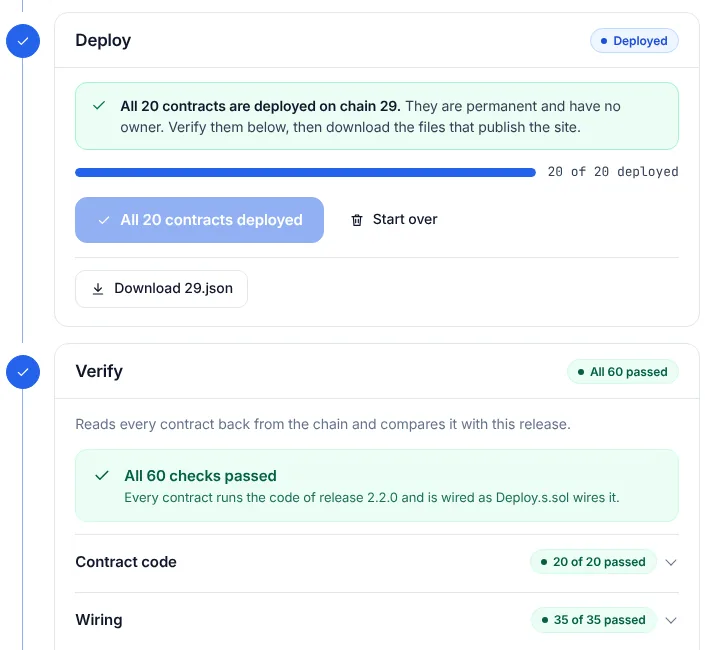
In the release rehearsal the result read "All 60 checks passed. Every contract runs the code of release 2.2.0 and is wired as Deploy.s.sol wires it." Run the checks again repeats them. When a check fails, the page says "Do not publish this deployment." and does not offer to publish it.
Step 6: publish to this site
Signed out, the step shows a small sign-in form: "Publishing needs the admin token. The deployment itself is safe on chain and stays saved in this browser."
Signed in, it shows Publish to collab.genesisl1.com (your host): "The admin service checks the record again, keeps it as deployments/29.json, rewrites config.js so that every page reads these contracts, and starts the prerender." Press Publish to this site and confirm. The page then shows what the server wrote and the prerender's progress. When the site already shows another deployment, the page warns that publishing replaces it; the replaced record stays in the server's history.
Publish, unpublish and check describes what happens next, and the Publish tab, which publishes an existing deployment.
Publish by hand
Publish by hand ("For a static host, or another site: the record and config.js") downloads the
deployment record (Download 29.json) and, once every check has passed, a config.js written
exactly as tools/write_web_config.py writes it, with options for the RPC endpoints, block
explorers, network name, site address, price API, Google Analytics ID and custom endpoints. It opens
by itself on a host without the admin service. See Hosting without the server kit.
Deploying with Foundry instead
forge script script/Deploy.s.sol deploys the same 20 contracts from a Foundry keystore account
and writes deployments/29.json. Publish that record from the Publish tab. See
Deploying COLLAB: reference.